
70-663 · Question #243
Your network contains two Active Directory forests. The forests contain domain controllers that run Windows Server 2008 R2. The forests are configured as shown in the following table. A one-way…
The correct answer is A. Create a forest trust from litwareinc.com to adatum.com. You need a forest trust from the organization where the Exchange environment lives to the user's organization. In this instance, Litware must have a trust of Adatum. Then, you need to create linked mailboxes. Deploy Exchange 2010 in an Exchange resource forest topology From a…
Question
Your network contains two Active Directory forests. The forests contain domain controllers that run Windows Server 2008 R2. The forests are configured as shown in the following table. A one-way forest trust exists from adatum.com to litwareinc.com. You plan to deploy an Exchange Server 2010 Service Pack 1 (SP1) organization. The organization will contain Mailbox servers in litwareinc.com. You need to ensure that users in adatum.com can access the mailboxes in the Exchange organization. What should you do?
Exhibit
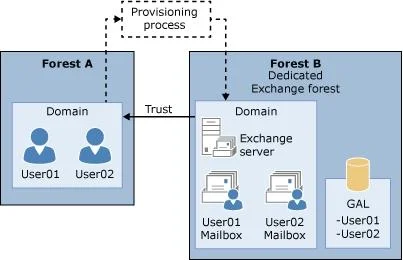
Options
- ACreate a forest trust from litwareinc.com to adatum.com.
- BCreate a forest trust from litwareinc.com to adatum.com.
- CChange the forest trust to an external trust.
- DDeploy Mailbox servers to adatum.com.
How the community answered
(38 responses)- A76% (29)
- B13% (5)
- C3% (1)
- D8% (3)
Explanation
You need a forest trust from the organization where the Exchange environment lives to the user's organization. In this instance, Litware must have a trust of Adatum. Then, you need to create linked mailboxes. Deploy Exchange 2010 in an Exchange resource forest topology From a domain controller in the Exchange forest, create a one-way outgoing trust so that the Exchange forest trusts the accounts forest. For detailed steps, see Create a one-way, outgoing, forest trust for both sides of the trust. In the Exchange forest, install Exchange 2010. Install Exchange the same way that you would in a single forest scenario. For detailed steps about how to install Exchange 2010, see one of the following topics: - Install Exchange Server 2010 - Install Exchange 2010 in Unattended Mode In the Exchange forest, for each user in the accounts forest that will have a mailbox in the Exchange forest, create a mailbox that is associated with an external account. Linked mailboxes are user mailboxes that are accessed by users in a separate, trusted forest. Linked mailboxes may be necessary for organizations that choose to deploy Exchange in a resource forest. Each mailbox that you create in the Exchange resource forest must have a disabled user object in the Exchange resource forest and an enabled user account in the accounts forest. Additionally, the accounts forest account must have access to log on to the linked mailbox that you create on the Exchange Server 2010 servers.
Topics
Community Discussion
No community discussion yet for this question.