
70-659 · Question #35
You have a Windows Server 2008 R2 Hyper-V server with a single network adaptor that is connected to a virtual network. The virtual network is configured as External. Virtual machines (VMs) running…
Sign in or unlock 70-659 to reveal the answer and full explanation for question #35. The question stem and answer options stay visible for context.
Question
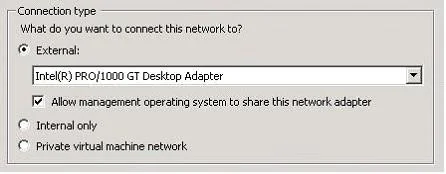
You have a Windows Server 2008 R2 Hyper-V server with a single network adaptor that is connected to a virtual network. The virtual network is configured as External. Virtual machines (VMs) running on the server are not able to communicate with the host server over the network. You need to ensure that VMs running on the server are able to communicate with the host server over the network. In Virtual Network Manager, what should you do?
Exhibit
Options
- ASelect the Internal only connection type.
- BSelect the Private virtual machine network connection type.
- CSelect the Allow management operating system to share this network adaptor check box.
- DClear the Allow management operating system to share this network adapter check box.
Unlock 70-659 to see the answer
You've previewed enough free 70-659 questions. Unlock 70-659 for full answers, explanations, the timed quiz mode, progress tracking, and the master PDF. Question stem and options stay visible so you can still see what's on the exam.