nerdexam
Microsoft

70-659 · Question #113

You are configuring networking for a new Windows Server 2003 SP2 virtual machine (VM) in a Windows Server 2008 R2 Hyper-V environment. You need to configure the VM to achieve optimum network…

The correct answer is A. Install Integration Services on the VM. B. In the virtual machine settings, add a Network Adapter. Bandwidth throttling may need to be adjusted for specific network configurations. The bandwidth throttling that is outlined in the following table provides control only for the outgoing traffic of a physical network adapter. To ensure end-to-end QoS and optimal network…

Configuring Server Virtualization Host and Guest Options

Question

You are configuring networking for a new Windows Server 2003 SP2 virtual machine (VM) in a Windows Server 2008 R2 Hyper-V environment. You need to configure the VM to achieve optimum network performance. Which two actions should you perform? (Each correct answer presents part of the solution. Choose two.)

Exhibit
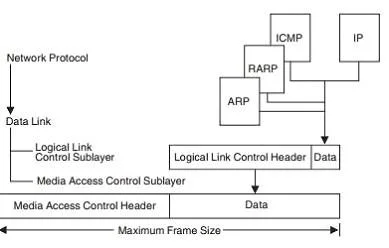
70-659 question #113 exhibit

Options

  • AInstall Integration Services on the VM.
  • BIn the virtual machine settings, add a Network Adapter.
  • CIn the virtual machine settings, add a Legacy Network Adapter.
  • DConfigure a fixed maximum transmission unit (MTU) size of 1384 on the host server virtual

How the community answered

(56 responses)
  • A
    82% (46)
  • C
    13% (7)
  • D
    5% (3)

Explanation

Bandwidth throttling may need to be adjusted for specific network configurations. The bandwidth throttling that is outlined in the following table provides control only for the outgoing traffic of a physical network adapter. To ensure end-to-end QoS and optimal network performance, refer to the QoS documentation from your network switch and router provider.\ you install the integration services, which improve performance and integration with the physical computer. Hyper-V includes a software package for supported guest operating systems that improves integration between the physical computer and the virtual machine. This package is referred to as integration services. Newer versions of supported Windows operating systems include the integration services and do not require installation after you install the guest operating system. For more information about which operating systems are supported and which of those require you to install integration services Although the I/O performance of physical SCSI and IDE devices can differ significantly, this is not true for the virtualized SCSI and IDE devices in Hyper-V. Hyper- V. IDE and SCSI devices both offer equally fast I/O performance when integration services are installed in the guest operating A legacy network adapter works without installing a virtual machine driver because the driver is already available on most operating systems. The legacy network adapter emulates a physical network adapter, multiport DEC 21140 10/100TX 100 MB. A legacy network adapter also supports network-based installations because it includes the ability to boot to the Pre-Boot Execution Environment (PXE). The legacy network adapter is not supported in the 64-bit edition of Windows Server2003 or the WindowsXP Professional x64 Edition. To connect a virtual machine to a virtual network, you add a virtual network adapter to the virtual machine and then connect the virtual network adapter to an existing virtual network. There are two types of network adapters available for Hyper-V: a network adapter and a legacy network The network adapter is designed specifically for Hyper-V and requires a virtual machine driver that is included with the Hyper-V integration services. This type of networking adapter provides better performance than a legacy network adapter and is the recommended choice when it can be used. Because this type of virtual network adapter requires integration services in the guest operating system, it can be used only with guest operating systems for which integration services are available The legacy network adapter emulates an Intel 21140-based PCI Fast Ethernet Adapter. This type of network adapter provides networking capabilities for two scenarios: when using a guest operating systems for which integration services are not available, and when network boot capabilities are required. The legacy network adapter uses a driver that is available in most operating systems, instead of a Hyper-V specific driver. The legacy network adapter also provides the ability to boot to the Pre-Boot Execution Environment (PXE). Maximum Transmission Unit (MTU) Different physical networks have different maximum frame sizes. Within the different frames, there is a maximum size for the data field. This value is called the maximum transmission unit (MTU), or maximum packet size in TCP/IP terms. If an IP datagram is to be sent out onto the network and the size of the data grams bigger than the MTU, IP will fragment the datagram, so that it will fit within the data field of the frame. If the MTU is larger than the network can support, then the data is lost. The value of MTU is especially important when bridging is used because of the different network limits. RFC 791-Internet Protocols states that all IP hosts must be prepared to accept datagrams of up to 576 bytes. Because of this, it is recommended that an MTU of 576 bytes be used if bridging (or routing) problems are suspected. Note: MTU is equivalent to the PACKET SIZE value on the GATEWAY statement, or the MAXMTU value when using BSDROUTINGPARMS in the TCPIP PROFILE file.

Topics

#Integration Services#network adapter#legacy network adapter#VM network performance

Community Discussion

No community discussion yet for this question.

Full 70-659 Practice