70-659 · Question #112
Your company's virtual environment includes Windows Server 2008 R2 Hyper-V servers. You manage the environment by using Microsoft System Center Virtual Machine Manager (VMM) 2008 R2. You need to…
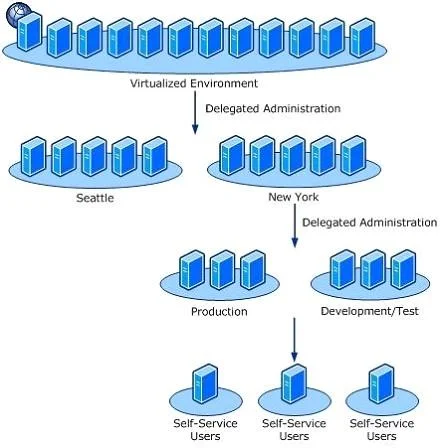
The correct answer is A. In VMM, create a Self-Service user role. Delegated Administrator role--Members of a role based on the Delegated Administrator profile have full VMM administrator rights, with a few exceptions, on all objects in the scope defined by the host groups and library that are assigned to the role. A delegated administrator…
Question
Your company's virtual environment includes Windows Server 2008 R2 Hyper-V servers. You manage the environment by using Microsoft System Center Virtual Machine Manager (VMM) 2008 R2. You need to provide a user with the ability to perform only the Create, Start, Stop, Pause, Resume, and Shut Down virtual machine (VM) management tasks on your host servers. What should you do?
Exhibit
Options
- AIn VMM, create a Self-Service user role.
- BIn VMM, create a Delegated Administrator user role.
- CIn VMM, assign the Local Administrator permission for the host servers to the user.
- DIn Authorization Manager, create a role on the users client computer and add the user to this
How the community answered
(35 responses)- A77% (27)
- B6% (2)
- C3% (1)
- D14% (5)
Explanation
Delegated Administrator role--Members of a role based on the Delegated Administrator profile have full VMM administrator rights, with a few exceptions, on all objects in the scope defined by the host groups and library that are assigned to the role. A delegated administrator cannot modify VMM settings or add or remove members of the Administrator role. Self-Service User role--Members of a role based on the Self-Service User profile can manage their own virtual machines within a restricted environment. Self-service users use the VMM Self- Service Web Portal to manage their virtual machines. The portal provides a simplified view of only the virtual machines that the user owns and the operations that the user is allowed to perform on them. A self-service user role specifies the operations that members can perform on their own virtual machines (these can include creating virtual machines) and the templates and ISO image files that they can use to create virtual machines. The user role also can place a quota on the virtual machines that a user can deploy at any one time. Self-service users' virtual machines are deployed transparently on the most suitable host in the host group that is assigned to the Administrator role-Members of the Administrator role can perform all VMM actions on all objects that are managed by the VMM server. Only one role can be associated with this profile. At least one administrator should be a member of the role. The following table describes the features of self-service user roles Ownership of Virtual Machines In virtual machine self-service, a virtual machine has an owner (by default, the user who created the virtual machine) and a self-service user role (by default, the self-service user role under which the virtual machine was created). The virtual machine's owner is the only person who can see and perform operations on a virtual machine in the VMM Self-Service Portal. A self-service user can change the owner of his own virtual machine to any other member of the self-service user role. If the owner is a member of more than one self-service user role, the user can change the virtual machine owner to any member of his other roles if the following requirements are met: The current owner must belong to the self-service user role that is being assigned. The virtual machine must be within the scope (host or library path) of that user role. Sharing Virtual Machines To enable users to share virtual machines, use a security group to add the users to a self-service user role, and then specify the group as the owner of the virtual machines you want group members to share. When a group member creates a virtual machine, the default owner is the person's user account. However, the user can reassign ownership to the group. If the virtual machine quota is being applied to individual users, quote points assigned to a group-owned virtual machine apply to the individual quotas of all members of the group.
Topics
Community Discussion
No community discussion yet for this question.
