nerdexam
Microsoft

70-659 · Question #143

You have a Windows Server 2008 R2 Hyper-V server. Hyper-V Manager shows a state of Paused and a status of Disk(s) running out of space for one of the virtual machines (VMs). You delete several…

The correct answer is D. Save the VM. CORRECT-you will recognize that when you delete an snaphot when a VM is running, it goes very fast and no further actions are taken (merge, delete...). Cause the merge can "only" be done when the VM is powered off. after this process is completed all *.AVHD files should be gone…

Configuring Hyper-V

Question

You have a Windows Server 2008 R2 Hyper-V server. Hyper-V Manager shows a state of Paused and a status of Disk(s) running out of space for one of the virtual machines (VMs). You delete several unneeded snapshots from the VM snapshot tree, and you resume the VM. After less than one minute, the state of the VM reverts to Paused. You need to enable the VM to return to a state of Running. What should you do first?

Exhibit
70-659 question #143 exhibit

Options

  • ATurn off the VM.
  • BExport the VM.
  • CReset the VM.
  • DSave the VM.

How the community answered

(50 responses)
  • A
    2% (1)
  • B
    6% (3)
  • C
    12% (6)
  • D
    80% (40)

Explanation

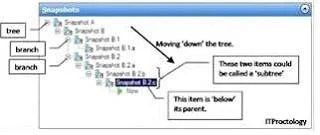
CORRECT-you will recognize that when you delete an snaphot when a VM is running, it goes very fast and no further actions are taken (merge, delete...). Cause the merge can "only" be done when the VM is powered off. after this process is completed all *.AVHD files should be gone (when no more snapshot are available)! "....To make it simple the current status ("NOW") will be kept and all other snapshot will be gone? Is it right?...." CORRECT-When you delete an snapshot (tree) and power off the VM, your latest "NOW" status will then be merged First of all, you can create a snapshot (wow, amazing stuff). This creates a differencing disk that reverences your base VHD, thus you always have that base VHD to return to, and saves your current memory status (if your VM was running). Second, you can Apply a snapshot. This takes me back to the point in time that is represented by the snapshot I selected. It does this by the same process as above, it creates a differencing disk and attaches it to the VHD that is referenced by the snapshot. Okay, if I am losing you-you need to back up and read the posts I referenced above. For the next couple you need to think about trees and the branching of a tree structure. The simplest way to show this is a single picture of an expanded tree (visual aids are always good). Third, I can delete a single snapshot. This deletes the moment in time that a snapshot represents, its differencing disk and any saved memory state. If a snapshot is below' this one on the sub tree, then its reference pointers are modified to reference the proper snapshot above' it. In this example I deleted Snapshot B.1 There are other things happening here as well. To maintain integrity of the snapshot timeline the differencing disks need to be merged. This happens in the background when a VM is powered off and I will save the gritty details for another post. Fourth, I can delete a snapshot sub tree. This deletes the moment in time that a snapshot represents and any other snapshots that are `below' it in the tree. Thus it does what a delete does, but without selecting individual snapshots, it takes an entire branch. Yes, we get a merge, not a revert as I mistakenly put in my graphic. Now, to get started on the really complicated post..what happens under the hood. I have alluded to this before with the instructions about how to manually merge VHDs. Maybe I need to back up even more and talk about differencing disks...hmm..

Topics

#VM snapshots#disk space exhaustion#paused VM state#snapshot merge

Community Discussion

No community discussion yet for this question.

Full 70-659 Practice