
70-649 · Question #62
You install all of the Web Server (IIS) role services on a server named Server1. You configure the Default Web Site to assign the IIS Manager Permissions for the site to a user named User1. From a…
Sign in or unlock 70-649 to reveal the answer and full explanation for question #62. The question stem and answer options stay visible for context.
Question
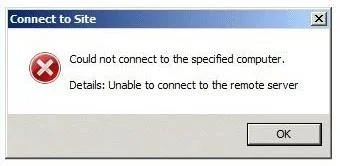
You install all of the Web Server (IIS) role services on a server named Server1. You configure the Default Web Site to assign the IIS Manager Permissions for the site to a user named User1. From a different computer, User1 attempts to connect to the Default Web Site on Server1 by using Internet Information Services (IIS) Manager and receives the following error message. You need to ensure that User1 can use Internet Information Services (IIS) Manager to remotely administer the Default Web Site on Server1. What should you do first?
Exhibit
Options
- AFrom the Internet Information Services (IIS) Manager console, configure the Feature Delegation feature.
- BFrom the Internet Information Services (IIS) Manager console, configure the Management Service feature.
- CFrom the Services console, modify the properties of the Web Management Service service.
- DFrom the Services console, modify the properties of the Windows Remote Management (WS-Management)
Unlock 70-649 to see the answer
You've previewed enough free 70-649 questions. Unlock 70-649 for full answers, explanations, the timed quiz mode, progress tracking, and the master PDF. Question stem and options stay visible so you can still see what's on the exam.