
70-649 · Question #87
Your network contains a server named Server1. An administrator named Admin1 installs the Windows Server Update Services (WSUS) server role on Server1. You open the Windows Server Update Services…
Sign in or unlock 70-649 to reveal the answer and full explanation for question #87. The question stem and answer options stay visible for context.
Question
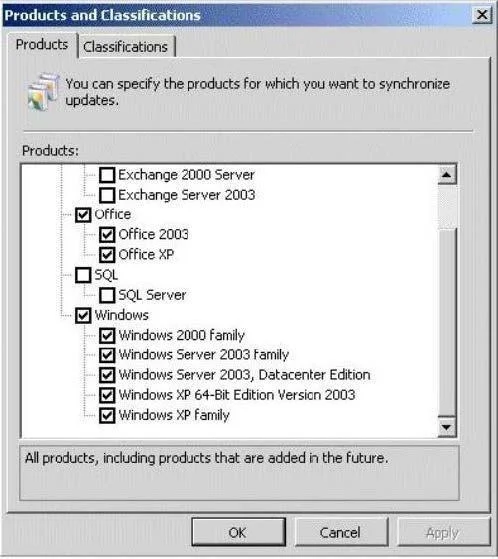
Your network contains a server named Server1. An administrator named Admin1 installs the Windows Server Update Services (WSUS) server role on Server1. You open the Windows Server Update Services console and view the Products and Classifications options as shown in the exhibit. (Click the Exhibit button.) You need to ensure that you can select updates for Windows Server 2008 R2 Service Pack 1 (SP1) from the Products and Classifications options. What should you do?
Exhibit
Options
- AFrom the Service console, restart the Update Services service.
- BFrom the WSUS Administration console, synchronize Server1.
- CFrom a command prompt, run gpudate /force.
- DFrom a command prompt, run wuauclt /detectnow.
Unlock 70-649 to see the answer
You've previewed enough free 70-649 questions. Unlock 70-649 for full answers, explanations, the timed quiz mode, progress tracking, and the master PDF. Question stem and options stay visible so you can still see what's on the exam.