
70-649 · Question #330
Your network contains a Network Load Balancing (NLB) cluster named NLB01. NLB01 contains two servers named Node1 and Node2 that run Windows Server 2008 R2. Node1 and Node2 are configured as shown in…
Sign in or unlock 70-649 to reveal the answer and full explanation for question #330. The question stem and answer options stay visible for context.
Question
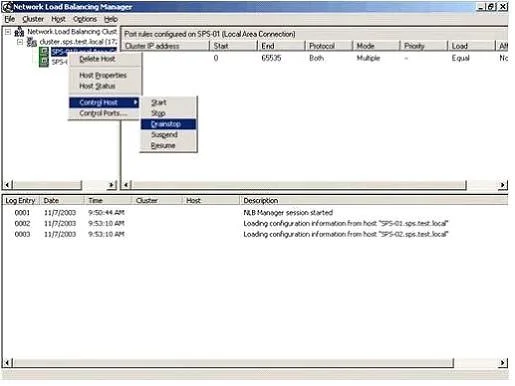
Your network contains a Network Load Balancing (NLB) cluster named NLB01. NLB01 contains two servers named Node1 and Node2 that run Windows Server 2008 R2. Node1 and Node2 are configured as shown in the following table. You need to install Windows updates on Node1 to meet the following requirements:
- Prevent new connections to Node1 while the updates are installed.
- Provide connected users with the ability to complete their session on
Node1 before the updates are installed. What should you do first?
Exhibit
Options
- AFrom Network Load Balancing Manager, right-click Model and click Drainstop.
- BFrom Network Load Balancing Manager, right-click Node1 and click Suspend.
- CFrom the Services console, right-click Workstation and click Pause.
- DFrom the Services console, right-click Server and click Pause.
Unlock 70-649 to see the answer
You've previewed enough free 70-649 questions. Unlock 70-649 for full answers, explanations, the timed quiz mode, progress tracking, and the master PDF. Question stem and options stay visible so you can still see what's on the exam.