
70-649 · Question #287
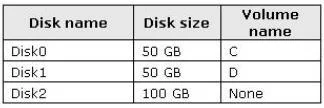
Your network contains a server that runs Windows 2008 R2. The disks on the server are configured as shown in the following table. Volume D contains shared files and applications. You plan to install…
Sign in or unlock 70-649 to reveal the answer and full explanation for question #287. The question stem and answer options stay visible for context.
Question
Your network contains a server that runs Windows 2008 R2. The disks on the server are configured as shown in the following table. Volume D contains shared files and applications. You plan to install an application named App1 on the server. App1 must be installed in D:\Appl. App1 requires 75 GB of disk space. You need to ensure that the server can support the planned installation of App1. The solution must minimize the impact on all users. What should you do?
Exhibit
Options
- AConfigure a striped volume.
- BConfigure a mirrored volume.
- CCreate a mount point.
- DCreate a virtual hard disk (VHD).
Unlock 70-649 to see the answer
You've previewed enough free 70-649 questions. Unlock 70-649 for full answers, explanations, the timed quiz mode, progress tracking, and the master PDF. Question stem and options stay visible so you can still see what's on the exam.