
70-649 · Question #245
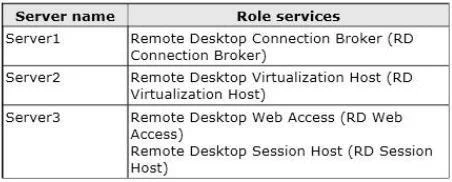
Your network contains three servers that run Windows Server 2008 R2. The servers are configured as shown in the following table. On Server1, you configure a virtual desktop pool named Pool1. Pool1…
The correct answer is D. On Server2, take a snapshot of Computer1 and rename the snapshot RDV_Rollback. To enable rollback on a virtual machine 1. Log on to RD Virtualization Host using an Administrator account. 2. Open Hyper-V Manager. To open Hyper-V Manager, clickStart, point toAdministrative Tools, and then clickHyper-V 3. UnderVirtual Machines, right-click the virtual…
Question
Your network contains three servers that run Windows Server 2008 R2. The servers are configured as shown in the following table. On Server1, you configure a virtual desktop pool named Pool1. Pool1 contains a Windows 7 virtual machine (VM) named Computer1. You need to ensure that when a user logs off of Computer1, all of the changes made to Computer1 are discarded. What should you do?
Exhibit
Options
- AFrom the properties of Pool1 on Server1, modify the Automatically save virtual machines setting.
- BFrom the Remote Desktop Session Host Configuration console on Server1, modify the Delete temporary
- COn Server2, enable shadow copies.
- DOn Server2, take a snapshot of Computer1 and rename the snapshot RDV_Rollback.
How the community answered
(51 responses)- A8% (4)
- B4% (2)
- C18% (9)
- D71% (36)
Explanation
To enable rollback on a virtual machine 1. Log on to RD Virtualization Host using an Administrator account. 2. Open Hyper-V Manager. To open Hyper-V Manager, clickStart, point toAdministrative Tools, and then clickHyper-V 3. UnderVirtual Machines, right-click the virtual machine to enable rollback, and then click 4. UnderSnapshots, right-click the snapshot of the virtual machine, and then clickRename. 5. TypeRDV_Rollbackand then press ENTER. 6. Close Hyper-V Manager. 7. Repeat these steps for each virtual machine.
Topics
Community Discussion
No community discussion yet for this question.