
Microsoft
70-649 · Question #219
Your network contains a server named Server1 that runs Windows Server 2008 R2. Server1 has the Network Policy Server (NPS) role service installed. You need to ensure that the NPS log files on…
Sign in or unlock 70-649 to reveal the answer and full explanation for question #219. The question stem and answer options stay visible for context.
Configuring Network Infrastructure
Question
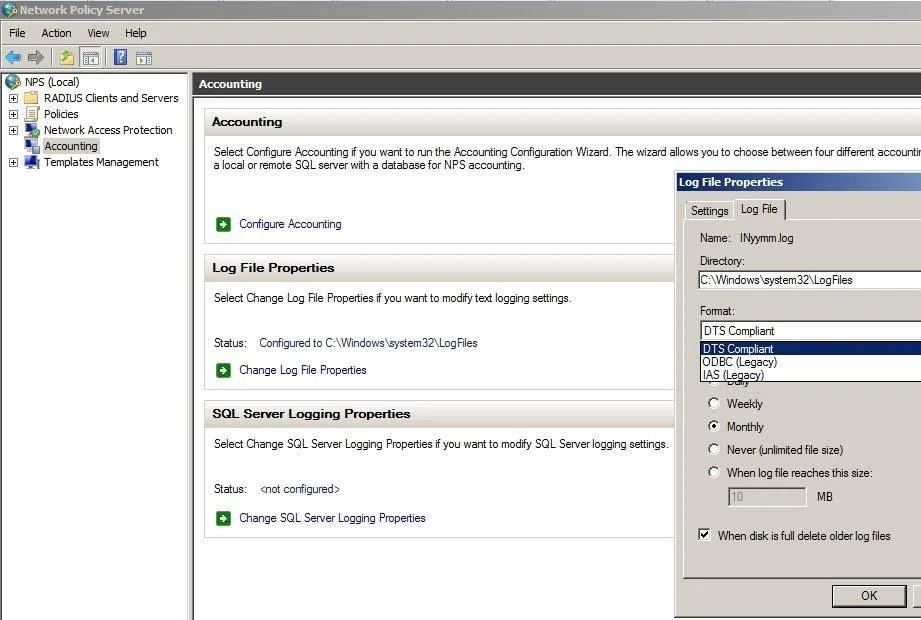
Your network contains a server named Server1 that runs Windows Server 2008 R2. Server1 has the Network Policy Server (NPS) role service installed. You need to ensure that the NPS log files on Server1 contain information about the duration of client connections. What should you do?
Exhibit
Options
- AEnable the Accounting requests setting.
- BConfigure the IAS (Legacy) log file format.
- CConfigure the DTS Compliant log file format.
- DEnable the Authentication requests setting.
Unlock 70-649 to see the answer
You've previewed enough free 70-649 questions. Unlock 70-649 for full answers, explanations, the timed quiz mode, progress tracking, and the master PDF. Question stem and options stay visible so you can still see what's on the exam.
Topics
#NPS#log file format#DTS Compliant#accounting