
70-649 · Question #205
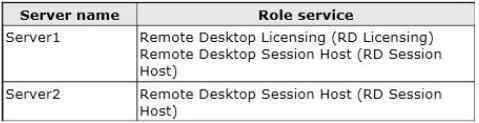
Your network contains a single Active Directory domain. The domain contains two servers. The servers are configured as shown in the following table. You install 100 Remote Desktop Services Per User…
Sign in or unlock 70-649 to reveal the answer and full explanation for question #205. The question stem and answer options stay visible for context.
Question
Your network contains a single Active Directory domain. The domain contains two servers. The servers are configured as shown in the following table. You install 100 Remote Desktop Services Per User client access licenses (RDS Per User CALs) on Server1. You discover that when users connect to Remote Desktop Services (RDS) on Server2, they receive temporary licenses. You need to ensure that users receive permanent licenses when they connect to Server2. What should you do?
Exhibit
Options
- AOn Server2, change the Remote Desktop licensing mode to Per User.
- BOn Server1, change the discovery scope of the license server to Domain.
- COn Server2, install the RD Licensing role service.
- DOn Server1, remove the RD Session Host role service.
Unlock 70-649 to see the answer
You've previewed enough free 70-649 questions. Unlock 70-649 for full answers, explanations, the timed quiz mode, progress tracking, and the master PDF. Question stem and options stay visible so you can still see what's on the exam.