
70-649 · Question #197
Your company runs Remote Desktop Services. You plan to install an application update for the lobapp.exe application on the Remote Desktop Session Host Server. You find instances of the lobapp.exe…
Sign in or unlock 70-649 to reveal the answer and full explanation for question #197. The question stem and answer options stay visible for context.
Question
Your company runs Remote Desktop Services. You plan to install an application update for the lobapp.exe application on the Remote Desktop Session Host Server. You find instances of the lobapp.exe processes left behind by users who have disconnected. You need to terminate all instances of the lobapp.exe processes so that you can perform an application update. What are two possible ways to achieve this goal? (Each correct answer presents a complete solution. Choose two.)
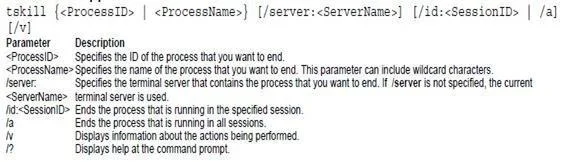
Exhibit
Options
- ARun the Tasklist /fi "IMAGENAME eq lobapp.exe" command on the Remote Desktop Session Host Server.
- BRun the Get-Process cmdlet on the Remote Desktop Session Host Server.
- CEnd all instances of lobapp.exe in the Remote Desktop Services Manager console.
- DRun the Tskill lobapp /a command on the Remote Desktop Session Host Server.
Unlock 70-649 to see the answer
You've previewed enough free 70-649 questions. Unlock 70-649 for full answers, explanations, the timed quiz mode, progress tracking, and the master PDF. Question stem and options stay visible so you can still see what's on the exam.