
70-649 · Question #179
Your network contains an Active Directory domain named contoso.com. All servers run Windows Server 2008 R2. Routers on the network support multicast transmissions. A server named Server1 has the…
Sign in or unlock 70-649 to reveal the answer and full explanation for question #179. The question stem and answer options stay visible for context.
Question
Your network contains an Active Directory domain named contoso.com. All servers run Windows Server 2008 R2. Routers on the network support multicast transmissions. A server named Server1 has the Windows Deployment Services (WDS) server role installed. A custom Windows 7 image is available for download from Server1. You need to deploy the image to 100 new computers by using multicast. The solution must prevent computers that use low-bandwidth connections from slowing the deployment to computers that use high-bandwidth connections. What should you do?
Exhibit
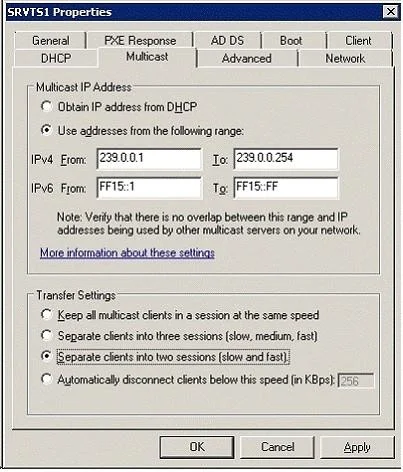
Options
- AEnable Auto-Cast.
- BEnable Scheduled-Cast.
- CFrom the WDS server properties, adjust the Transfer Settings.
- DFrom the WDS server properties, modify the Multicast IP Address settings.
Unlock 70-649 to see the answer
You've previewed enough free 70-649 questions. Unlock 70-649 for full answers, explanations, the timed quiz mode, progress tracking, and the master PDF. Question stem and options stay visible so you can still see what's on the exam.