
Microsoft
70-649 · Question #101
Your network contains a server that runs Windows Server 2008 R2 named Server1. You install a new application on Server1. After the installation, you discover that Server1 frequently becomes…
Sign in or unlock 70-649 to reveal the answer and full explanation for question #101. The question stem and answer options stay visible for context.
Configuring Server Management and Maintenance
Question
Your network contains a server that runs Windows Server 2008 R2 named Server1. You install a new application on Server1. After the installation, you discover that Server1 frequently becomes unavailable. You need to identify whether the issues on Server1 coincide with the installation of the application. What should you do?
Exhibit
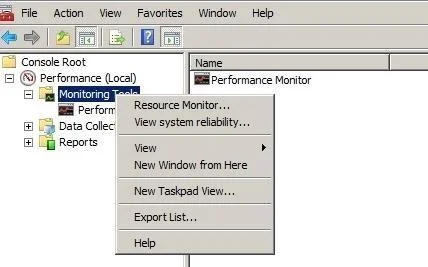
Options
- AFrom Administrative Tools, run Windows Memory Diagnostic.
- BFrom Reliability Monitor, review the reliability details.
- CFrom the command prompt, run the Program Compatibility Wizard.
- DFrom the System Configuration utility, select Diagnostic startup.
Unlock 70-649 to see the answer
You've previewed enough free 70-649 questions. Unlock 70-649 for full answers, explanations, the timed quiz mode, progress tracking, and the master PDF. Question stem and options stay visible so you can still see what's on the exam.
Topics
#Reliability Monitor#application stability#event correlation#troubleshooting