
70-497 · Question #12
You are using Microsoft Test Manager (MTM). You have been assigned to work on a test case for an application that is still in development. There have been changes to the test case. You need to know…
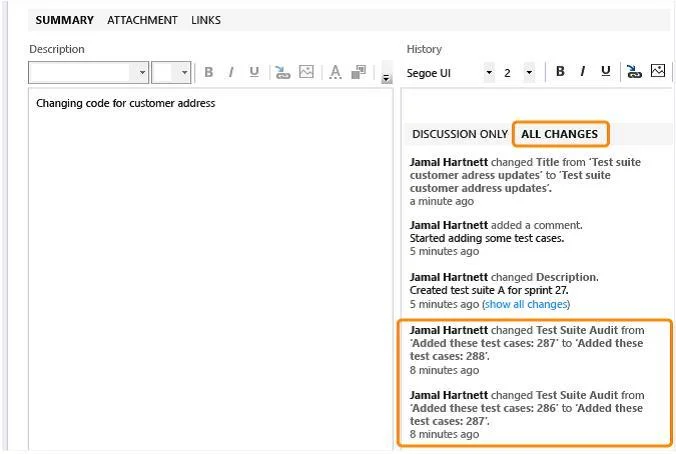
The correct answer is C. Open the test case work item, click the Summary tab, and click All changes. Q: Can I get an audit trail for test plans and test suites? A: Yes. With TFS 2013.3, work item history tracks changes to test plans and test suites. For example, adding tests to a test suite or changing configurations are tracked. In the work item form, under History, choose…
Question
You are using Microsoft Test Manager (MTM). You have been assigned to work on a test case for an application that is still in development. There have been changes to the test case. You need to know what changes have been made. What should you do?
Exhibit
Options
- AOpen the test case work item, click on Links, then view links of the linked type Versioned
- BView the automatic collected change document on the Attachments tab.
- COpen the test case work item, click the Summary tab, and click All changes.
- DAdd a link to a test change document from the test plan properties.
How the community answered
(38 responses)- A3% (1)
- B8% (3)
- C71% (27)
- D18% (7)
Explanation
Q: Can I get an audit trail for test plans and test suites? A: Yes. With TFS 2013.3, work item history tracks changes to test plans and test suites. For example, adding tests to a test suite or changing configurations are tracked. In the work item form, under History, choose ALL CHANGES to view the audit trail.
Topics
Community Discussion
No community discussion yet for this question.