
70-497 · Question #6
You are using Microsoft Test Manager (MTM). Your development team is using Team Foundation Server (TFS) 2012 to associate requirements with source code and to automate builds. Your team has been…
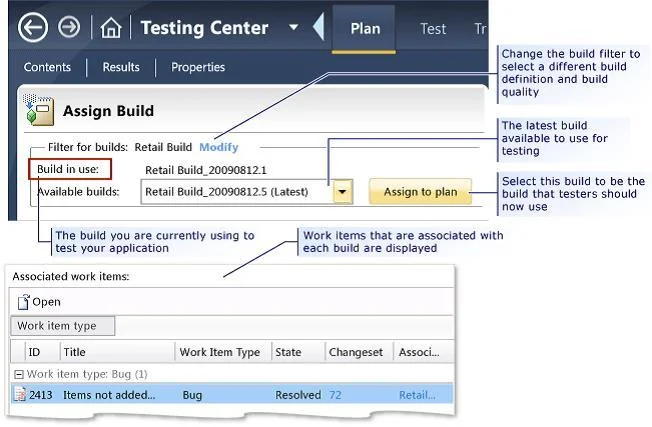
The correct answer is A. In the Properties View of the Plan activity, click Modify the Build In Use. To select from the build candidates that you want to consider using for your test plan, you have to select a build filter for your test plan. After you have selected the build you are currently using to test, you can select a later build to see which work items have been…
Question
You are using Microsoft Test Manager (MTM). Your development team is using Team Foundation Server (TFS) 2012 to associate requirements with source code and to automate builds. Your team has been testing against an old build. You want to assign a more recent automated build to the test plan. You need to review the requirements that have been affected between the current build and the new build before assigning it to your test plan. What should you do?
Exhibit
Options
- AIn the Properties View of the Plan activity, click Modify the Build In Use.
- BSet up a check-in policy that will force an association of a work item to the changeset.
- CIn the Assign Build view of the Track tab, click Modify.
- DIn the Queries view of the Track activity, create a custom query that lists all requirements that
How the community answered
(39 responses)- A74% (29)
- B15% (6)
- C3% (1)
- D8% (3)
Explanation
To select from the build candidates that you want to consider using for your test plan, you have to select a build filter for your test plan. After you have selected the build you are currently using to test, you can select a later build to see which work items have been associated with each of the builds between these two selected builds, as shown in the following illustration.
Topics
Community Discussion
No community discussion yet for this question.