
70-491 · Question #9
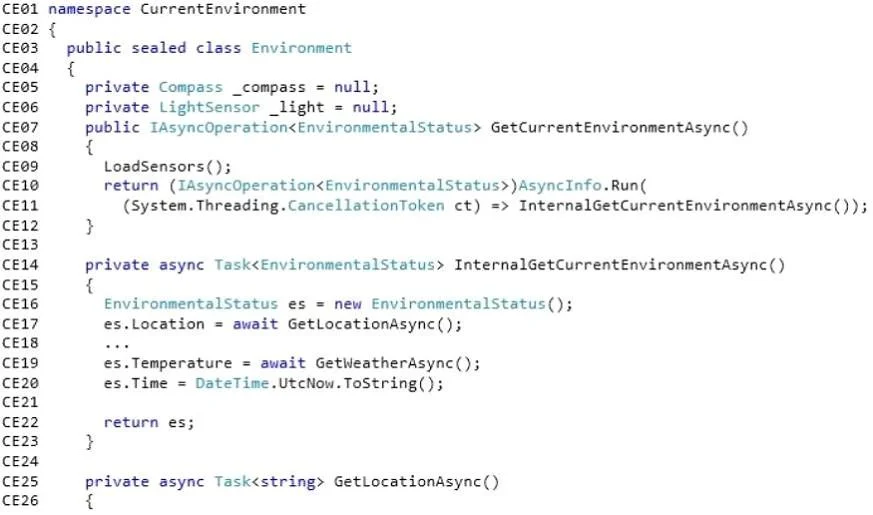
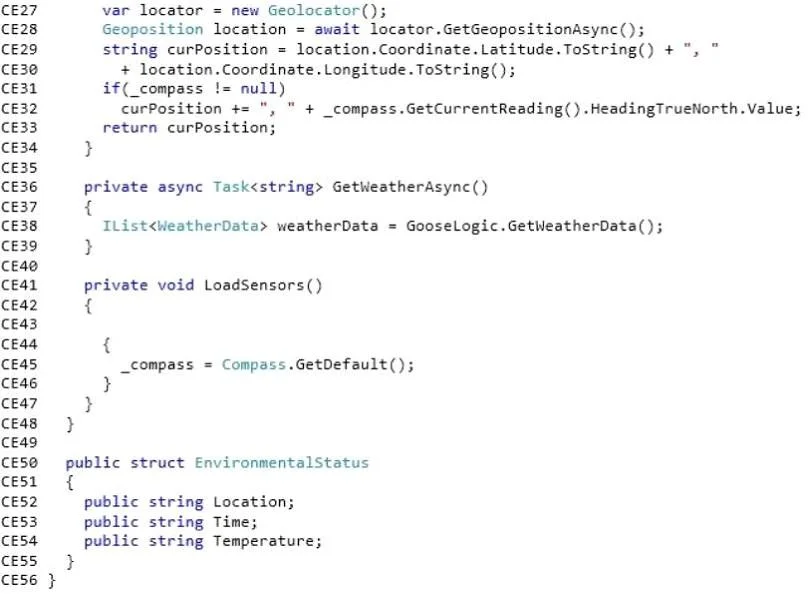
Users report performance issues when getting the location information associated with a photo. You suspect the app is encountering performance issues in the GetLocationAsync() method of the…
The correct answer is D. Move the locator variable to a class level variable and initialize it in the Environment. Case Study 4 - Scenario 4 (Question 10 - Question 13) You are developing a Windows Store app named Picture Sharer. The app will allow users to capture, modify, caption, and share pictures. Application Structure The ShareImageButton and GetContactsButton controls use the same…
Question
Users report performance issues when getting the location information associated with a photo. You suspect the app is encountering performance issues in the GetLocationAsync() method of the Environment class. You need to enhance the performance of the GetLocationAsync() method of the app. What should you do?
Exhibits
Options
- ARemove the Compass initialization from the LoadSensors() method and initialize it within the
- Bset the ReportInterval property of the Compass object to 16.
- Cset the ReportInterval property of the Compass object to 0.
- DMove the locator variable to a class level variable and initialize it in the Environment
How the community answered
(30 responses)- A13% (4)
- B7% (2)
- C3% (1)
- D77% (23)
Explanation
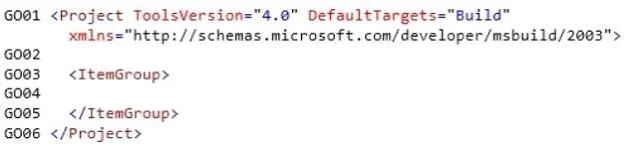
Case Study 4 - Scenario 4 (Question 10 - Question 13) You are developing a Windows Store app named Picture Sharer. The app will allow users to capture, modify, caption, and share pictures. Application Structure The ShareImageButton and GetContactsButton controls use the same foreground color. The foreground color might change in the future. The following code defines a custom button style named ButtonStyleRed: Relevant portions of the app files are shown. (Line numbers are included for reference only and include a two-character prefix that denotes the specific file to which they belong.) Business Requirements The app must meet the following business requirements: - Allow users to capture and retrieve pictures, modify pictures by adding a shading effect, and add captions to images. - Support only Landscape and Landscape-flipped orientation. - Allow users to capture and retrieve pictures, modify pictures by adding a shading effect, and add captions to images. - Support only Landscape and Landscape-flipped orientations. - Ensure that users can select and modify images from the PictureChooserPage page. - Ensure that users can change the magnification of the selected image and resize the image by using pinch and stretch gestures. Scaling should be fluid and precisely controlled by the user. The app must be localized for the French Canadian market Technical Requirements The app must meet the following technical requirements: - Scroll bars must not be visible. - The CaptionTextBlock and CaptionTextBox controls must appear side by side, without overlapping and on the same line. - The CaptionTextBox control should appear to the right of the CaptionTextBlock control. - The ContactPicker object must be filtered to display only email - Minimize the code that is required to implement optical zoom You must perform the following tasks: - Handle the Click event of the GetPictureButton control to switch from the current page to the PictureChooserPage page. - After the user selects an image on the PictureChooserPage page, ensure that the app navigates back to the PictureSharerMainPage page. - Track the current screen orientation and page size by updating the _currentViewState, _currentHeight and _currentWidth fields every time the screen orientation or page size changes. - Create a style named ButtonStyleWhite that inherits all the style settings of the ButtonStyleRed style except the border color; the border color must be white. The ButtonStyleWhite style must automatically update with any changes that are made to the ButtonStyleRed style. - Create a resource named ButtonForegroundColor to implement the button foreground color so that it can be referenced in XAML by using the following standard syntax: Foreground="{StaticResource ButtonForegroundColor}" - Ensure that the OnNavigatedToO method updates the current picture when a new picture is selected. - Change the background for the root Grid element to a vertical gradient that transitions from black at the top to maroon at the bottom. Create a resource named GridBackgroundGradientBrush to hold the requested While testing the app, you observe the following results: - An exception is being thrown in the GetContactsCompleted event handler when the retrieved email address is assigned to the RecipientsTextBlock control. The exception message states: "The application called an interface that was marshalled for a different thread." - When users navigate away from the PictureSharerMainPage page, information that was entered in the CaptionTextBox control is lost. PictureSharerMainPage.xaml PictureSharerMainPage.xaml.es PictureChooserPage.xaml
Topics
Community Discussion
No community discussion yet for this question.