
70-489 · Question #32
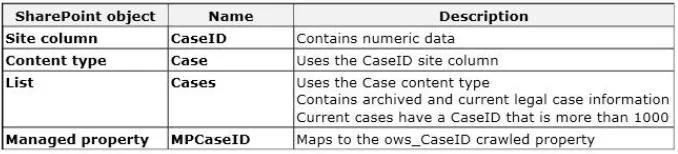
You create a SharePoint site collection for a law firm. You create the following objects in the site collection. A user searches for a legal case. The search results must contain only current cases…
The correct answer is B. MPCaseID. In SharePoint search, result types use managed properties to define filtering conditions. The 'MP' prefix in MPCaseID identifies it as a managed property, which is the correct object type for result type rules.
Question
You create a SharePoint site collection for a law firm. You create the following objects in the site collection. A user searches for a legal case. The search results must contain only current cases. You need to create a custom result type that displays only current cases. Which object should you use?
Exhibit
Options
- ACases
- BMPCaseID
- Ccase
- Dows_CaseID
- ECaseID
How the community answered
(32 responses)- A13% (4)
- B78% (25)
- C3% (1)
- D6% (2)
Why each option
In SharePoint search, result types use managed properties to define filtering conditions. The 'MP' prefix in MPCaseID identifies it as a managed property, which is the correct object type for result type rules.
Cases is the name of a list or library in the site collection, not a managed property, so it cannot be used directly in search result type conditions.
SharePoint search result types are built on managed properties - indexed, queryable properties that are mapped from crawled properties in the search schema. The 'MP' prefix in MPCaseID is a naming convention indicating it is a managed property, making it the appropriate object to reference when configuring a result type condition that filters for current cases. Raw column names and crawled properties cannot be used directly in result type definitions.
case refers to a content type name rather than a managed property, and result type conditions require managed properties defined in the search schema.
ows_CaseID is a crawled property (the ows_ prefix denotes a raw SharePoint list column value discovered during crawl), and crawled properties must first be mapped to a managed property before they can be used in result type rules.
CaseID is the site column name and is not itself a managed property - it must be mapped through the search schema to a managed property before it can be referenced in result type conditions.
Concept tested: SharePoint Search managed properties for custom result types
Source: https://learn.microsoft.com/en-us/sharepoint/manage-search-schema
Topics
Community Discussion
No community discussion yet for this question.