
70-466 · Question #50
You are developing a BI Semantic Model (BISM) that retrieves data from several sources including a SQL Azure database and an OData data feed. The model will be deployed to a server with…
The correct answer is A. Select the tabular project type and use the In-Memory query mode. When maximizing performance is the goal and data latency is acceptable, the tabular In-Memory mode is optimal because it caches the entire dataset in RAM and queries run against that cache without touching source systems.
Question
Exhibits
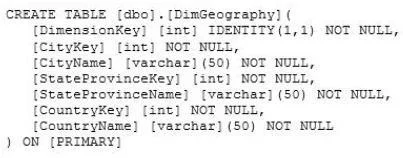
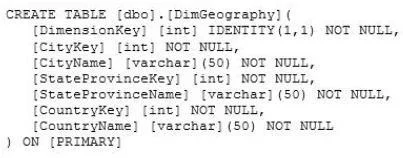
Options
- ASelect the tabular project type and use the In-Memory query mode.
- BSelect the multidimensional project type and use the MOLAP storage mode.
- CSelect the tabular project type and use the DirectQuery query mode.
- DSelect the multidimensional project type and use the ROLAP storage mode.
How the community answered
(43 responses)- A81% (35)
- B12% (5)
- C5% (2)
- D2% (1)
Why each option
When maximizing performance is the goal and data latency is acceptable, the tabular In-Memory mode is optimal because it caches the entire dataset in RAM and queries run against that cache without touching source systems.
The tabular project type natively supports OData data feeds as a data source, making it the correct choice when one source is an OData feed. In-Memory (VertiPaq) mode loads all data into the server's RAM at processing time, delivering the fastest possible query response. Because data latency of up to one month is acceptable, periodic refreshes are sufficient and DirectQuery latency is not needed.
The multidimensional project type does not natively support OData data feeds as a direct data source, making this option impractical for the stated requirements.
DirectQuery mode forwards every query to the source system in real time, which maximizes data freshness but does not maximize performance compared to In-Memory caching.
ROLAP storage mode in a multidimensional project queries the relational source at query time, providing the worst query performance among the options and also lacks native OData support.
Concept tested: Tabular vs multidimensional model and query mode selection
Source: https://learn.microsoft.com/en-us/analysis-services/tabular-models/directquery-mode-ssas-tabular
Topics
Community Discussion
No community discussion yet for this question.