
70-466 · Question #88
You need to create a measure for DOD sales. What should you do? (Each correct answer presents part of the solution. Choose all that apply.)
The correct answer is A. Specify a date table by using a Mark as Date table. B. Use the Data Analysis Expressions (DAX) PARALLELPERIOD() function. Creating a Day-Over-Day (DOD) measure in a DAX tabular model requires marking the date table and using a DAX time intelligence function to shift the date context.
Question
Exhibit
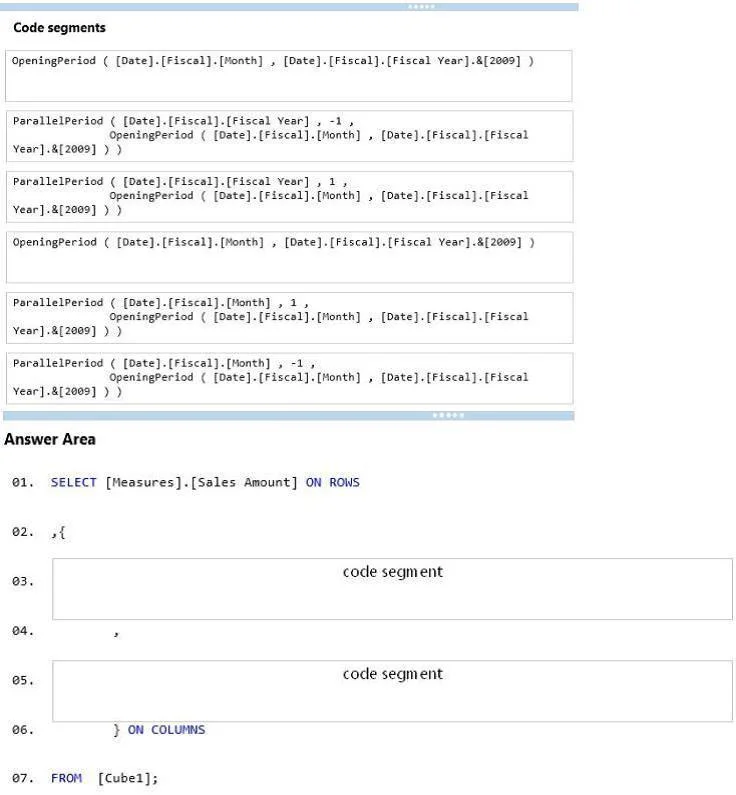
Options
- ASpecify a date table by using a Mark as Date table.
- BUse the Data Analysis Expressions (DAX) PARALLELPERIOD() function.
- CUse the Business Intelligence Wizard to define time intelligence.
- DUse the Multidimensional Expressions (MDX) LAG() function.
How the community answered
(51 responses)- A71% (36)
- C22% (11)
- D8% (4)
Why each option
Creating a Day-Over-Day (DOD) measure in a DAX tabular model requires marking the date table and using a DAX time intelligence function to shift the date context.
Marking a table as a Date Table registers it with the DAX engine as the authoritative date table, which is a prerequisite for time intelligence functions to work correctly by enabling proper date context transitions.
PARALLELPERIOD() is a DAX time intelligence function that returns a parallel period offset from the current date context, making it suitable for period-over-period comparisons such as DOD, WOW, or YOY calculations.
The Business Intelligence Wizard is a feature of SSAS Multidimensional models, not DAX tabular models, so it cannot be used to define time intelligence in a Power BI or tabular SSAS context.
LAG() is an MDX function used in Multidimensional Expression queries against SSAS Multidimensional cubes, not a DAX function, so it cannot be used in a tabular or Power BI measure.
Concept tested: DAX time intelligence with marked date table
Source: https://learn.microsoft.com/en-us/dax/time-intelligence-functions-dax
Topics
Community Discussion
No community discussion yet for this question.