
70-465 · Question #3
Drag and Drop Question You are planning to deploy a database to Windows Azure SQL Database. You need to design a stored procedure to update rows. The stored procedure must meet the following…
The correct answer is Begin an explicit transaction.; Perform the update in a try block.; Read the @@ROWCOUNT system variable.; Raise an error and roll back the transaction if the row count is less than 1.; Commit the transaction in a finally block. Explanation: Azure SQL Stored Procedure Design The Core Requirements 1. If more than one row is updated -> raise an error and discard the update 2. Maximize concurrency (critical for elimination) --- Step-by-Step Placement Reasoning 1. Begin an explicit transaction Must be…
Question
Exhibit
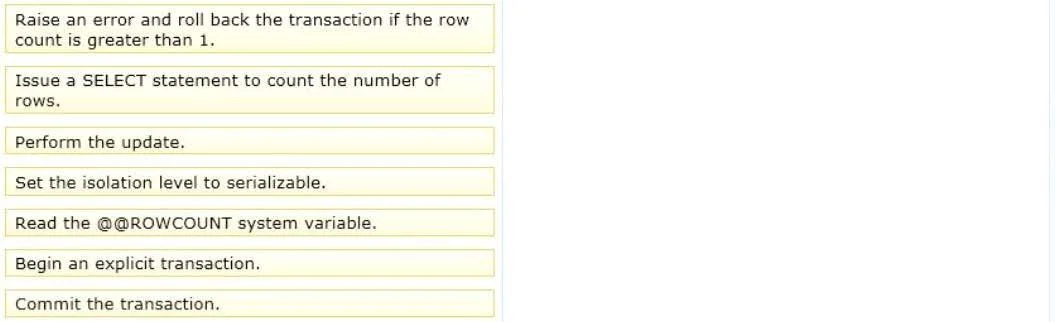
Answer Area
Drag items
Correct arrangement
- Begin an explicit transaction.
- Perform the update in a try block.
- Read the @@ROWCOUNT system variable.
- Raise an error and roll back the transaction if the row count is less than 1.
- Commit the transaction in a finally block.
Explanation
Explanation: Azure SQL Stored Procedure Design
The Core Requirements
- If more than one row is updated -> raise an error and discard the update
- Maximize concurrency (critical for elimination)
Step-by-Step Placement Reasoning
1. Begin an explicit transaction Must be first. Without a transaction boundary, you have nothing to roll back if the rowcount check fails. This wraps the entire operation atomically so the update can be discarded as a unit.
2. Perform the update in a try block The DML goes inside TRY so SQL Server's structured error handling can catch runtime failures. The update can't happen before the transaction starts, and must happen before you can check how many rows it affected.
3. Read the @@ROWCOUNT system variable
Must immediately follow the UPDATE - @@ROWCOUNT is reset by every subsequent statement. Reading it right away captures how many rows the UPDATE affected. This is why the "Issue a SELECT statement to count rows" option is wrong - it's redundant, slower, and resets @@ROWCOUNT before you can use it.
4. Raise an error and roll back the transaction if the row count is [not exactly 1]
Note: The item says "less than 1" but the requirement says "more than one row." This is almost certainly a typo in the question - the condition should be
@@ROWCOUNT > 1. The logic: if more than one row was affected, raise an error and roll back, discarding all changes.
5. Commit the transaction in a finally block If execution reaches here (no rollback occurred), commit the valid single-row update. The "finally block" framing means it runs after the try block completes without error.
Items Correctly Excluded - and Why
| Excluded Item | Why It's Wrong |
|---|---|
| Set isolation level to serializable | Serializable is the most restrictive isolation level - it holds range locks and kills concurrency. The requirement says maximize concurrency. This is the primary trap in this question. |
| Issue a SELECT statement to count rows | @@ROWCOUNT already captures this after the UPDATE with no extra query or locking. A SELECT is wasteful and resets @@ROWCOUNT. |
| Raise an error in a catch block | The requirement's error condition is a business rule (rowcount > 1), not a SQL runtime exception. The conditional raise after checking @@ROWCOUNT handles it. |
| Commit in a finally block | This one is included - listed here to note it is not in the catch path. |
Common Mistakes
- Choosing serializable because it sounds "safe" for concurrency control - it actually does the opposite. Use the default
READ COMMITTEDorSNAPSHOTisolation for maximum concurrency. - Using SELECT COUNT(*) instead of
@@ROWCOUNT- the latter is built into the DML execution and requires no extra query. - Checking rowcount before the update -
@@ROWCOUNTonly has meaning after a statement executes. - Rolling back in the wrong place - the rollback must happen inside the rowcount check (step 4), not deferred to a catch block, because this is a business logic check, not an exception.
Topics
Community Discussion
No community discussion yet for this question.