
70-465 · Question #22
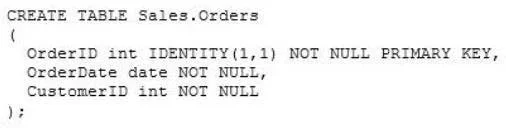
You are designing a SQL Server database for an order fulfillment system. You create a table named Sales.Orders by using the following script: Each order is tracked by using one of the following…
The correct answer is A. To the Sales.Orders table, add a column named Status that will store the order status. The best solution is to add a Status column to the Sales.Orders table, as this provides the core attribute for current status and enables the use of SQL Server's system-versioned temporal tables for historical tracking.
Question
Exhibit
Options
- ATo the Sales.Orders table, add a column named Status that will store the order status.
- BCreate a new table named Sales.OrderStatus that contains three columns named OrderID,
- CImplement change data capture on the Sales.Orders table.
- DTo the Sales.Orders table, add three columns named FulfilledDate, ShippedDate, and
How the community answered
(27 responses)- A74% (20)
- B7% (2)
- C15% (4)
- D4% (1)
Why each option
The best solution is to add a Status column to the Sales.Orders table, as this provides the core attribute for current status and enables the use of SQL Server's system-versioned temporal tables for historical tracking.
Adding a `Status` column directly to the `Sales.Orders` table establishes the primary attribute for an order's current state. This design is optimal because it can then be easily enhanced by enabling SQL Server's system-versioned temporal tables, which automatically track all changes to the `Status` column (and other columns), allowing users to query the status of an order as it existed on any given historical date without complex manual history management, while also natively supporting new status values.
While creating a separate `Sales.OrderStatus` table could store historical status information, it requires manual management of the history and additional application logic to retrieve the current status or historical status, making it less integrated and automatic than SQL Server's temporal tables.
Implementing change data capture (CDC) tracks all data modifications, but it is an operational feature primarily for auditing or data integration, not the primary design for how status data is stored and queried directly within an application for historical 'as of' queries.
Adding separate date columns for each status is not extensible, as adding new statuses would require modifying the table schema by adding new columns, violating the requirement to easily add new statuses in the future.
Concept tested: SQL Server Temporal Tables and Schema Design for History
Source: https://learn.microsoft.com/en-us/sql/relational-databases/tables/temporal-tables?view=sql-server-ver16
Topics
Community Discussion
No community discussion yet for this question.