
70-465 · Question #149
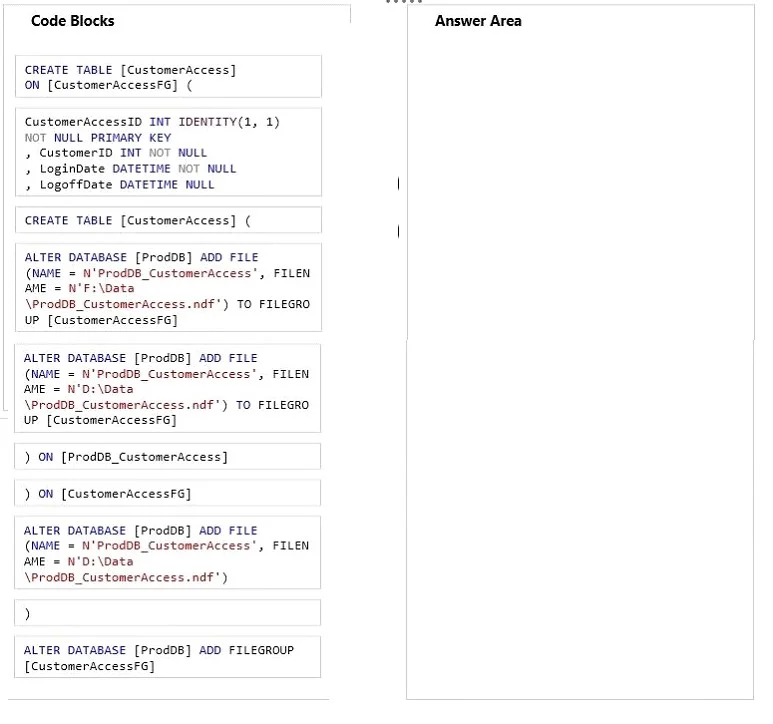
Drag and Drop Question You need to create the CustomerAccess table to support the reporting and performance requirements. Develop the solution by selecting and arranging the required code blocks in…
The correct answer is ALTER DATABASE [ProdDB] ADD FILEGROUP [CustomerAccessFG]; ALTER DATABASE [ProdDB] ADD FILE (NAME = N'ProdDB_CustomerAccess', FILENAME = N'D:\Data\\ProdDB_CustomerAccess.ndf') TO FILEGROUP [CustomerAccessFG]; CREATE TABLE [CustomerAccess] ON [CustomerAccessFG] (; CustomerAccessID INT IDENTITY(1, 1) NOT NULL PRIMARY KEY , CustomerID INT NOT NULL , LoginDate DATETIME NULL , LogoffDate DATETIME NULL; ) ON [CustomerAccessFG]. SQL Server: Creating a Table on a Custom Filegroup This question tests knowledge of SQL Server storage architecture - specifically, how to place a table on a dedicated filegroup for performance/reporting isolation. --- The Correct Arrangement, Explained Step 1: ALTER DATABASE…
Question
Exhibit
Answer Area
Drag items
Correct arrangement
- ALTER DATABASE [ProdDB] ADD FILEGROUP [CustomerAccessFG]
- ALTER DATABASE [ProdDB] ADD FILE (NAME = N'ProdDB_CustomerAccess', FILENAME = N'D:\Data\ProdDB_CustomerAccess.ndf') TO FILEGROUP [CustomerAccessFG]
- CREATE TABLE [CustomerAccess] ON [CustomerAccessFG] (
- CustomerAccessID INT IDENTITY(1, 1) NOT NULL PRIMARY KEY , CustomerID INT NOT NULL , LoginDate DATETIME NULL , LogoffDate DATETIME NULL
- ) ON [CustomerAccessFG]
Explanation
SQL Server: Creating a Table on a Custom Filegroup
This question tests knowledge of SQL Server storage architecture - specifically, how to place a table on a dedicated filegroup for performance/reporting isolation.
The Correct Arrangement, Explained
Step 1: ALTER DATABASE [ProdDB] ADD FILEGROUP [CustomerAccessFG]
You must create the filegroup before anything else. A filegroup is a logical container for data files. SQL Server requires the filegroup to exist before you can add files to it or reference it in a CREATE TABLE. Skipping this causes an error because the name CustomerAccessFG is unknown to the database.
Step 2: ALTER DATABASE [ProdDB] ADD FILE (...) TO FILEGROUP [CustomerAccessFG]
Once the filegroup exists, you add a physical .ndf data file to it. The TO FILEGROUP clause assigns the file to the filegroup created in Step 1. This is what actually allocates disk space for the filegroup to use.
Common mistake: Using the distractor block that omits
TO FILEGROUP [CustomerAccessFG]. Without that clause, the file gets added to thePRIMARYfilegroup, not your custom one - the table would then land in the wrong place.
Step 3: CREATE TABLE [CustomerAccess] ON [CustomerAccessFG] (
This is the non-standard but correct syntax for SQL Server when specifying a filegroup. The ON [CustomerAccessFG] clause comes before the opening ( of the column list, telling SQL Server which filegroup to store the table's data on.
Common mistake: Using
CREATE TABLE [CustomerAccess]((the distractor withoutON [CustomerAccessFG]). That creates the table on thePRIMARYfilegroup, defeating the entire purpose of Steps 1-2.
Step 4: Column definitions
CustomerAccessID INT IDENTITY(1,1) NOT NULL PRIMARY KEY
, CustomerID INT NOT NULL
, LoginDate DATETIME NULL
, LogoffDate DATETIME NULL
Column definitions always go inside the parentheses - after the opening ( from Step 3. No ordering choice here; this is standard DDL structure.
Step 5: ) ON [CustomerAccessFG]
This closes the CREATE TABLE statement. The trailing ON [CustomerAccessFG] here is part of the syntax when the opening line already specifies the filegroup - it closes the construct started in Step 3.
Common mistake: Using
)alone or) ON [ProdDB_CustomerAccess]. The closing must match the filegroup name (not the physical file name).ProdDB_CustomerAccessis the file name;CustomerAccessFGis the filegroup name - these are different things.
Discarded Blocks - Why They're Wrong
| Block | Why discarded |
|---|---|
CREATE TABLE [CustomerAccess]( | Missing ON [CustomerAccessFG] - lands on PRIMARY filegroup |
ALTER DATABASE ... ADD FILE (without TO FILEGROUP) | File goes to PRIMARY, not custom filegroup |
) ON [ProdDB_CustomerAccess] | References the file name, not the filegroup name |
) | Closes the table but loses the filegroup assignment |
Key Concept Summary
The order follows a strict dependency chain: Filegroup -> File -> Table (referencing filegroup)
You cannot reference something that doesn't exist yet in SQL Server DDL. Each step is a prerequisite for the next.
Topics
Community Discussion
No community discussion yet for this question.