
70-246 · Question #63
Your company has a private cloud that is managed by using a System Center 2012 Virtual Machine Manager (VMM) infrastructure. The infrastructure contains several Hyper-V hosts. You configure VMM to…
The correct answer is B. the Assignment Scope of the baseline. To add a Windows Server Update Server to VMM In the VMM console, open the Fabric workspace. On the Home tab, in the Add group, click Add Resources, and then click Update Server. The Add Windows Server Update Services Server dialog box opens. In Computer name, enter the fully…
Question
Your company has a private cloud that is managed by using a System Center 2012 Virtual Machine Manager (VMM) infrastructure. The infrastructure contains several Hyper-V hosts. You configure VMM to use an update server and to synchronize the updates by using a Windows Server Update Services (WSUS) server. You attempt to verify compliance with the Sample Baseline for Security Updates. You view the console as shown in the exhibit. (Click the Exhibit button.) You need to ensure that you can verify compliance for the Hyper-v hosts. What should you modify?
Exhibit
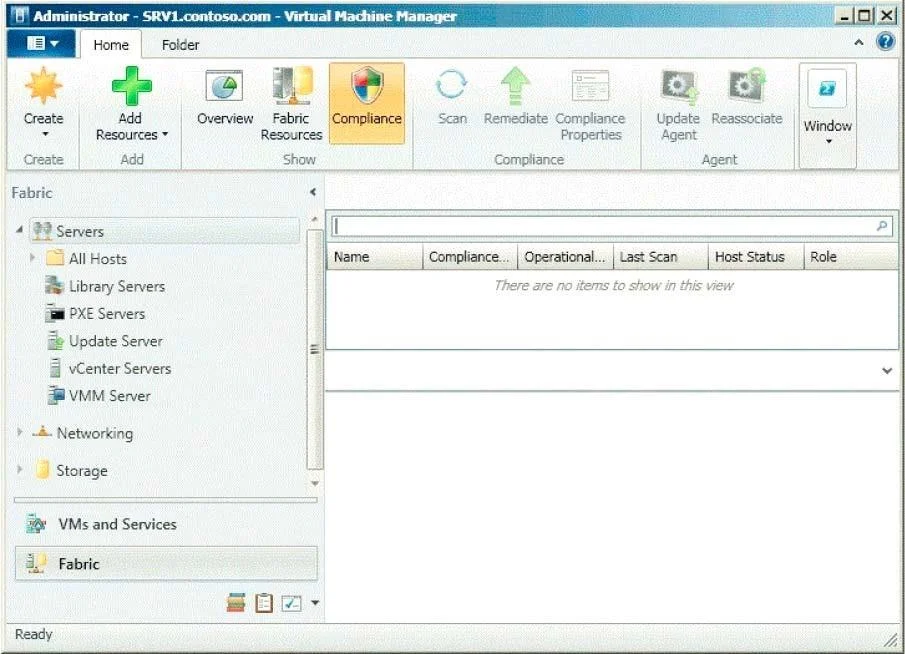
Options
- Athe update classifications of the update server
- Bthe Assignment Scope of the baseline
- Cthe default configuration provider
- Dthe Network settings of the All Hosts host group
How the community answered
(43 responses)- A12% (5)
- B81% (35)
- C5% (2)
- D2% (1)
Explanation
To add a Windows Server Update Server to VMM In the VMM console, open the Fabric workspace. On the Home tab, in the Add group, click Add Resources, and then click Update Server. The Add Windows Server Update Services Server dialog box opens. In Computer name, enter the fully qualified domain name (FQDN) of the WSUS server (for example, VMMServer01.contoso.com). Specify which TCP/IP port that the WSUS website listens on for connections (for example, port Enter credentials for connecting to the WSUS server. The account must have administrator rights on the WSUS server. If necessary, select the Use Secure Socket Layer (SSL) to communicate with the WSUS server and clients check box. The WSUS server will be added to VMM, followed by initial synchronization of the updates catalog. Depending on how many update classifications and products you chose when you installed the WSUS server, this operation can take a long time, depending on such factors as network traffic and the load on the WSUS server. To find out the status of the operation, monitor the status of the Add Update Server and Synchronize Update Server jobs in the Jobs window or in the Jobs workspace. After you enable update management in VMM, you should manage the WSUS server only through VMM, unless you are using a WSUS server in a Configuration Manager environment. To verify that the WSUS server was added to VMM successfully: In the Fabric workspace, on the Fabric pane, expand Servers, and click Update Server. The results pane should display the WSUS server. In the Library workspace, on the Library pane, expand Update Catalog and Baselines, and then click Update Catalog. The results pane should display the updates that were downloaded during WSUS synchronization.
Topics
Community Discussion
No community discussion yet for this question.