
70-158 · Question #2
Your company network includes Forefront Identity Manager (FIM) 2010. You manage the FIM 2010 Add-ins and Extensions through a Group Policy Object (GPO) configured according to the two exhibits…
The correct answer is A. Add fim.adatum.com to the Configure valid ActiveX sites policy setting. E. Add the address or addresses of mailboxes that host the FIM web service to the Configure valid senders. This question tests knowledge of configuring FIM 2010 GPO settings to enable Password Reset Registration and Outlook-based approvals. Two specific policy settings must be correctly configured to meet both requirements.
Question
Exhibit
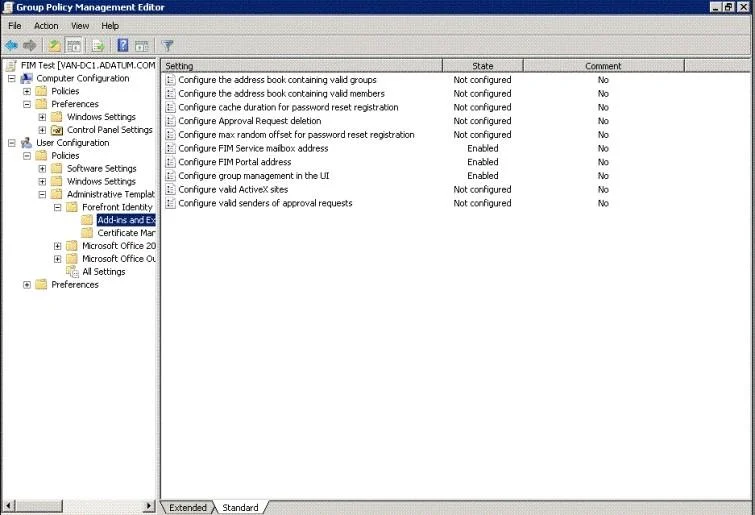
Options
- AAdd fim.adatum.com to the Configure valid ActiveX sites policy setting.
- BAdd the group address book to the Configure the address book containing valid groups policy setting.
- CAdd the member address book to the Configure the address book containing valid members policy setting.
- DAdd the address or addresses of FIM administrators to the Configure valid senders of approval requests
- EAdd the address or addresses of mailboxes that host the FIM web service to the Configure valid senders
How the community answered
(25 responses)- A76% (19)
- B8% (2)
- C12% (3)
- D4% (1)
Why each option
This question tests knowledge of configuring FIM 2010 GPO settings to enable Password Reset Registration and Outlook-based approvals. Two specific policy settings must be correctly configured to meet both requirements.
Adding fim.adatum.com to the 'Configure valid ActiveX sites' policy setting is required because FIM's Password Reset and Registration portal uses an ActiveX control that must be explicitly trusted via this GPO setting; without it, users cannot access or complete the self-service registration workflow.
The 'Configure the address book containing valid groups' setting is used to define which address book FIM searches when resolving group membership, not for enabling password reset registration or Outlook approval buttons.
The 'Configure the address book containing valid members' setting controls which address book is used to look up valid group members in FIM workflows, and is unrelated to enabling password reset or rendering Outlook approval buttons.
Adding FIM administrator addresses to 'Configure valid senders of approval requests' is incorrect because the approval emails are sent from the FIM service mailbox, not from administrator accounts; using administrator addresses would not trigger the Approve/Reject buttons in Outlook.
The 'Configure valid senders of approval requests' policy setting must include the address of the mailbox hosting the FIM web service because Outlook uses this setting to validate that incoming approval request emails originate from a trusted FIM source, which is what causes the Approve and Reject buttons to render in the Outlook client.
Concept tested: FIM 2010 GPO settings for approvals and registration
Source: https://learn.microsoft.com/en-us/microsoft-identity-manager/deploy-use/microsoft-identity-manager-deploy
Topics
Community Discussion
No community discussion yet for this question.