
350-801 · Question #339
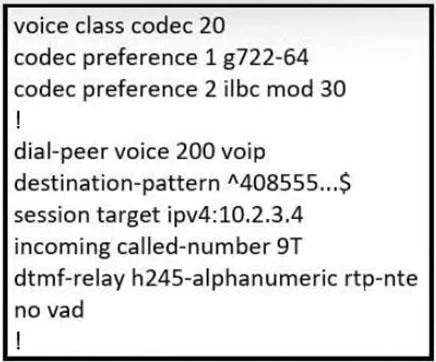
Refer to the exhibit. An administrator configured a codec preference list with G.722 and ILBC codecs. Which change must the administrator make in the dial-peer section of the configuration to use…
The correct answer is D. add voice-class codec 20. To apply a pre-defined codec preference list, configured with tag 20, to a dial-peer in Cisco IOS, the administrator must use the voice-class codec 20 command.
Question
Refer to the exhibit. An administrator configured a codec preference list with G.722 and ILBC codecs. Which change must the administrator make in the dial-peer section of the configuration to use this list?
Exhibit
Options
- Aadd voice-codecs 20
- Badd session codec 20
- Cadd codec preference 20
- Dadd voice-class codec 20
How the community answered
(23 responses)- A4% (1)
- B4% (1)
- C4% (1)
- D87% (20)
Why each option
To apply a pre-defined codec preference list, configured with tag 20, to a dial-peer in Cisco IOS, the administrator must use the `voice-class codec 20` command.
`voice-codecs 20` is not a valid or standard Cisco IOS command for applying a codec preference list to a dial-peer.
`session codec 20` is not a valid or standard Cisco IOS command for applying a codec preference list to a dial-peer.
`codec preference 20` is not a valid or standard Cisco IOS command for applying a codec preference list to a dial-peer; `voice-class codec` is the correct syntax.
In Cisco IOS voice gateway configurations, codec preference lists are defined globally using `voice-class codec <tag>`. To apply this named list to a specific dial-peer, the command `voice-class codec <tag>` (where `<tag>` is the numerical identifier, such as 20) must be used within the dial-peer configuration mode.
Concept tested: Cisco IOS Voice Gateway codec list application
Source: https://www.cisco.com/c/en/us/td/docs/ios/dial/configuration/guide/dial_12_4_book/dial_12_4_chapter011.html#wp1050720
Topics
Community Discussion
No community discussion yet for this question.