
350-701 · Question #835
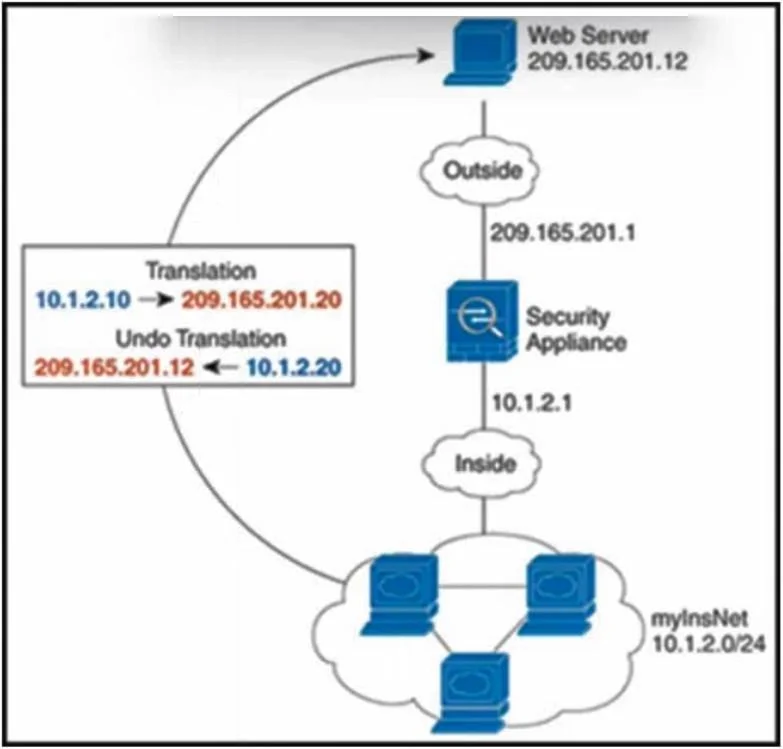
Drag and Drop Question Refer to the exhibit. An engineer must configure dynamic NAT on a Cisco Adaptive Security Appliance firewall so that when inside users connect to an outside web server, that…
The correct answer is hostname(config)# object network myNatPool hostname(config-network-object)# range 209.165.201.20 209.165.201.30; hostname(config)# object network myInsNet hostname(config-network-object)# subnet 10.1.2.0 255.255.255.0; hostname(config-network-object)# nat (inside,outside) dynamic myNatPool; hostname(config)# object network myWebServ hostname(config-network-object)# host 209.165.201.12; hostname(config)# nat (outside,inside) static 10.1.2.20. Cisco ASA Dynamic NAT - Explanation Scenario Summary Two NAT rules are needed on the ASA: 1. Outbound dynamic NAT - inside users are translated to a pool of outside addresses when going out. 2. Outside static NAT - the outside web server's real address (209.165.201.12) is…
Question
Drag and Drop Question Refer to the exhibit. An engineer must configure dynamic NAT on a Cisco Adaptive Security Appliance firewall so that when inside users connect to an outside web server, that web server address is translated to an address that appears to be on the inside network. Drag and drop the commands from the left onto the corresponding actions on the right that are needed to complete the implementation. Answer:
Exhibit
Answer Area
Drag items
Correct arrangement
- hostname(config)# object network myNatPool hostname(config-network-object)# range 209.165.201.20 209.165.201.30
- hostname(config)# object network myInsNet hostname(config-network-object)# subnet 10.1.2.0 255.255.255.0
- hostname(config-network-object)# nat (inside,outside) dynamic myNatPool
- hostname(config)# object network myWebServ hostname(config-network-object)# host 209.165.201.12
- hostname(config)# nat (outside,inside) static 10.1.2.20
Explanation
Cisco ASA Dynamic NAT - Explanation
Scenario Summary
Two NAT rules are needed on the ASA:
- Outbound dynamic NAT - inside users are translated to a pool of outside addresses when going out.
- Outside static NAT - the outside web server's real address (209.165.201.12) is translated to an inside address (10.1.2.20) so it appears to be on the inside network.
Item-by-Item Breakdown
Step 1 - Define the NAT pool
object network myNatPool
 range 209.165.201.20 209.165.201.30
Why first: You must define the pool object before you can reference it in a nat statement. This pool provides the translated addresses used when inside hosts communicate outbound. Trying to reference myNatPool in a nat command before this object exists will fail.
Step 2 - Define the inside network
object network myInsNet
 subnet 10.1.2.0 255.255.255.0
Why second: This object identifies which hosts will be translated. On ASA, object NAT is configured under the network object that represents the real source, so myInsNet must be created before you can attach a nat rule to it.
Step 3 - Apply dynamic NAT to inside users
nat (inside,outside) dynamic myNatPool
Why third: This command is entered in the config-network-object context of myInsNet (step 2). It binds the rule to that object. The syntax (inside,outside) means: traffic originating on the inside interface going to the outside gets translated using myNatPool. This cannot come before steps 1 and 2 because both the source object and the pool object must already exist.
Step 4 - Define the outside web server
object network myWebServ
 host 209.165.201.12
Why fourth: This creates the object representing the real address of the outside server. You need this object to attach the outside NAT rule to it. Ordering it before step 5 is required for the same reason as step 2 before step 3.
Step 5 - Apply static outside NAT for the web server
nat (outside,inside) static 10.1.2.20
Why fifth/last: This is the key rule that answers the question. (outside,inside) means traffic coming from the outside interface to the inside - the server's real address (209.165.201.12) is statically translated to 10.1.2.20. Inside hosts connect to 10.1.2.20, and the ASA translates it to the real server address. This must come last because myWebServ must already be defined.
Common Mistakes & Misconceptions
| Mistake | Why it's wrong |
|---|---|
Confusing (inside,outside) with (outside,inside) | Direction matters: the first interface is where the real address lives, the second is where the translated address is seen |
| Applying step 3 at global config instead of under the object | Object NAT (nat under a network object) requires the config-network-object context |
| Thinking step 5 is PAT/dynamic | It's static NAT - the server always maps to the same inside address |
| Skipping the NAT pool (step 1) | ASA will reject the dynamic myNatPool reference if the object doesn't exist |
| Conflating the two NAT rules | These are independent rules: one for outbound inside traffic, one for the outside server appearing inside |
Mental Model
Inside host (10.1.2.x)  ->  ASA  ->  translated to 209.165.201.20-30  ->  Internet
                                                                    ↓
                                            Outside web server (209.165.201.12)
                                                appears as 10.1.2.20 to inside
Topics
Community Discussion
No community discussion yet for this question.