
350-701 · Question #280
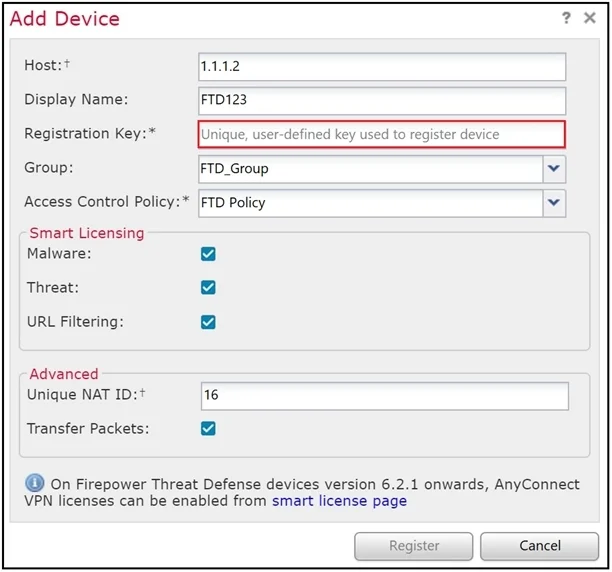
Refer to the exhibit. An administrator is adding a new Cisco FTD device to their network and wants to manage it with Cisco FMG. The Cisco FTD is not behind a NAT device. Which command is needed to…
The correct answer is D. configure manager add <FMC IP address> <registration key>. When you add a managed device to the Cisco FMC, you must provide an IP addresses of the managed device along with a registration key for authentication. The Cisco FMC and the managed device use the registration key and a NAT ID (instead of IP addresses in the case that the…
Question
Refer to the exhibit. An administrator is adding a new Cisco FTD device to their network and wants to manage it with Cisco FMG. The Cisco FTD is not behind a NAT device. Which command is needed to enable this on the Cisco FTD?
Exhibit
Options
- Aconfigure manager add DONTRESOLVE kregistration key>
- Bconfigure manager add <FMC IP address> <registration key> 16
- Cconfigure manager add DONTRESOLVE <registration key> FTD123
- Dconfigure manager add <FMC IP address> <registration key>
How the community answered
(54 responses)- A11% (6)
- B6% (3)
- C4% (2)
- D80% (43)
Explanation
When you add a managed device to the Cisco FMC, you must provide an IP addresses of the managed device along with a registration key for authentication. The Cisco FMC and the managed device use the registration key and a NAT ID (instead of IP addresses in the case that the device is behind NAT) to authenticate and authorize for initial registration.
Topics
Community Discussion
No community discussion yet for this question.