
350-701 · Question #833
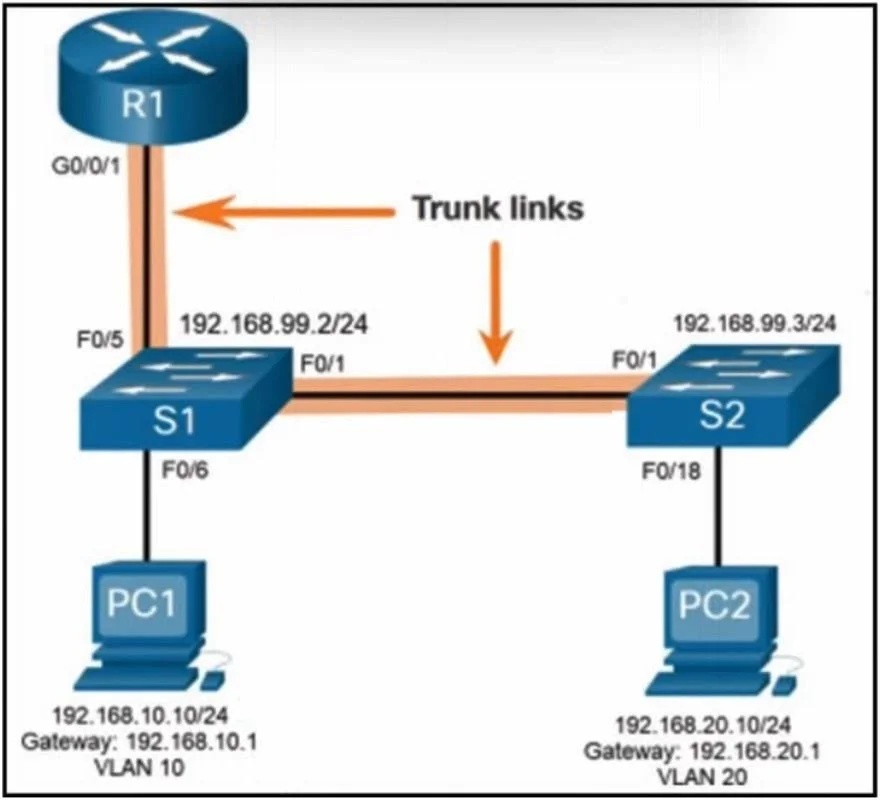
Refer to the exhibit. A network engineer configures a network on a Cisco switch that has interVLAN routing where PC1 belongs to VLAN10 and PC2 belongs to VLAN20. Which action should be taken to…
The correct answer is D. Create VLAN10 and assign port Fa0/6. To enable PC1 (which is in VLAN10) to access the internet, the following configuration steps are 1. Create VLAN10: This ensures that the VLAN for PC1 is properly configured on the switch. 2. Assign port Fa0/6 to VLAN10: The port Fa0/6, where PC1 is connected, must be assigned…
Question
Refer to the exhibit. A network engineer configures a network on a Cisco switch that has interVLAN routing where PC1 belongs to VLAN10 and PC2 belongs to VLAN20. Which action should be taken to allow the devices on PC1 to connect to the internet?
Exhibit
Options
- ADelete VLAN20 and recreate new VLANs.
- BCreate VLAN10.
- CCreate VLAN10 and assign port G0/0/1.
- DCreate VLAN10 and assign port Fa0/6.
How the community answered
(40 responses)- A18% (7)
- B5% (2)
- C8% (3)
- D70% (28)
Explanation
To enable PC1 (which is in VLAN10) to access the internet, the following configuration steps are 1. Create VLAN10: This ensures that the VLAN for PC1 is properly configured on the switch. 2. Assign port Fa0/6 to VLAN10: The port Fa0/6, where PC1 is connected, must be assigned to VLAN10 to associate the device with the correct VLAN. The configuration ensures proper communication between VLAN10 and the router for interVLAN routing and internet access.
Topics
Community Discussion
No community discussion yet for this question.