
350-601 · Question #585
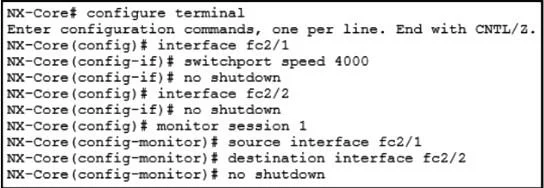
Refer to the exhibit. An engineer implements SPAN configuration on a Nexus 9000 Series Switch. Which two commands are necessary to complete the SPAN session configuration? (Choose two.)
The correct answer is B. Configure the switchport mode SD under interface fc2/1. D. Configure the switchport monitor under interface fc2/2. For Fibre Channel SPAN on a Cisco Nexus 9000, the SPAN session requires a source port and a destination port. Based on the exhibit context: interface fc2/1 is the source port that needs to be placed in SD (SPAN Destination-capable) mode using switchport mode SD, enabling it to…
Question
Refer to the exhibit. An engineer implements SPAN configuration on a Nexus 9000 Series Switch. Which two commands are necessary to complete the SPAN session configuration? (Choose two.)
Exhibit
Options
- AConfigure the switchport mode SD under interface fc2/2.
- BConfigure the switchport mode SD under interface fc2/1.
- CConfigure session type fc under monitor session 1.
- DConfigure the switchport monitor under interface fc2/2.
- EConfigure switchport speed 4000 under interface fc2/2.
How the community answered
(65 responses)- A11% (7)
- B78% (51)
- C3% (2)
- E8% (5)
Explanation
For Fibre Channel SPAN on a Cisco Nexus 9000, the SPAN session requires a source port and a destination port. Based on the exhibit context: interface fc2/1 is the source port that needs to be placed in SD (SPAN Destination-capable) mode using switchport mode SD, enabling it to participate as a SPAN destination. Interface fc2/2 requires switchport monitor to be configured, which marks it as a monitored (source) interface for the SPAN session. Option A is incorrect because fc2/2 is the source, not the destination. Option C (session type fc) would be needed if defining a new FC SPAN session type, but the exhibit indicates the session already exists. Option E (speed configuration) is not required for SPAN functionality.
Topics
Community Discussion
No community discussion yet for this question.