
350-501 · Question #535
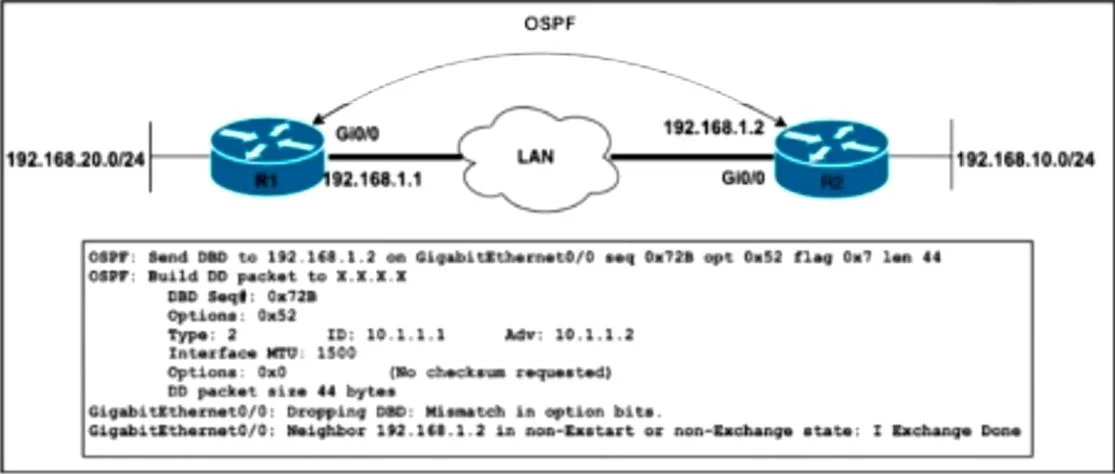
Refer to the exhibit. A network engineer just upgraded the Cisco IOS XE Software to the newest version on OSPF routers R1 and R2, added the point-to-point network type under Gi0/0 on R2, and…
The correct answer is A. Set the network type of the R2 OSPF interface to broadcast. Because R1’s GigabitEthernet0/0 is using the default (broadcast) network type while R2 was manually set to point‑to‑point, their OSPF option bits don’t match and the adjacency can’t progress past Exstart. Restoring R2’s interface to broadcast (so both sides use the same network…
Question
Refer to the exhibit. A network engineer just upgraded the Cisco IOS XE Software to the newest version on OSPF routers R1 and R2, added the point-to-point network type under Gi0/0 on R2, and configured ip route 192.168.10.0 255.255.255.0 192.168.1.2 on R1. After the engineer restarted the routers, R1 entered the Exstart state with its neighbor, but the adjacency has not been established. Which action must the engineer take to resolve the issue?
Exhibit
Options
- ASet the network type of the R2 OSPF interface to broadcast.
- BAdd a static route toward 192.168.20.0 on R2.
- CChange the R2 OSPF router ID to 10.1.1.1.
- DDecrease the OSPF cost of the network on R2 to 10.
How the community answered
(31 responses)- A81% (25)
- B6% (2)
- C10% (3)
- D3% (1)
Explanation
Because R1’s GigabitEthernet0/0 is using the default (broadcast) network type while R2 was manually set to point‑to‑point, their OSPF option bits don’t match and the adjacency can’t progress past Exstart. Restoring R2’s interface to broadcast (so both sides use the same network type) allows them to elect DR/BDR and finish the adjacency.
Topics
Community Discussion
No community discussion yet for this question.