
350-501 · Question #450
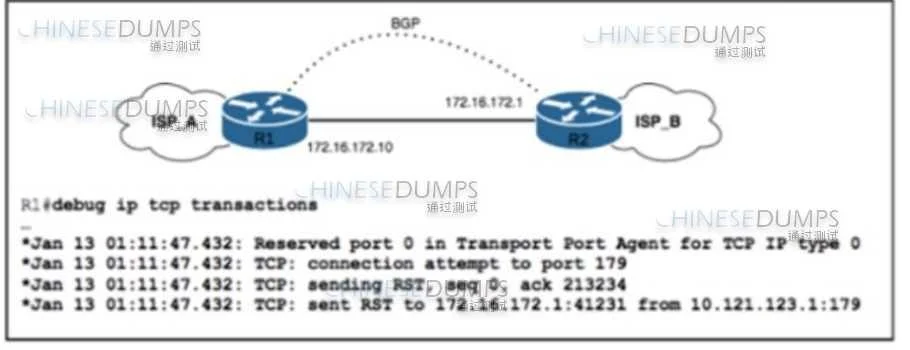
Refer to the exhibit. ISP_A and ISP_B use AS numbers 38321 and 16213 respectively. After a network engineer reloaded router R1, the BGP session with R2 failed to establish. The engineer confirmed…
The correct answer is C. Configure neighbor update-source lo0 on R2. The BGP session between R1 and R2 failed to establish after R1 reloaded because R2 was likely attempting to establish the BGP session with R1's loopback using an incorrect source IP. Specifying update-source lo0 on R2 ensures it uses its loopback interface IP for BGP…
Question
Refer to the exhibit. ISP_A and ISP_B use AS numbers 38321 and 16213 respectively. After a network engineer reloaded router R1, the BGP session with R2 failed to establish. The engineer confirmed BGP next-hop availability with a connectivity test between the router loopback addresses 10.121.123.2 and 10.121.123.1, as well as between interfaces Gi1/1 and Gi1/2. EBGP multihop has been configured on both routers. Which action must the engineer take to resolve the issue?
Exhibit
Options
- AConfigure transport connection-mod?passive on R2.
- BConfigure neighbor 172.16.172.1 authentication on R1
- CConfigure neighbor update-source lo0 on R2
- DConfigure remote-as 16213 on R1.
How the community answered
(23 responses)- A4% (1)
- B13% (3)
- C78% (18)
- D4% (1)
Why each option
The BGP session between R1 and R2 failed to establish after R1 reloaded because R2 was likely attempting to establish the BGP session with R1's loopback using an incorrect source IP. Specifying `update-source lo0` on R2 ensures it uses its loopback interface IP for BGP connections to R1's loopback.
The `transport connection-mode passive` command is used to make a router listen for BGP connections rather than actively initiating them and is not directly related to resolving a source IP mismatch for loopback peering.
There is no indication in the problem statement that BGP authentication is configured or failing, so adding authentication to only one side (R1) would not resolve the issue.
When BGP peers are configured to establish sessions between their loopback interfaces, the `update-source` command is essential to ensure that BGP packets are sourced from the loopback interface's IP address. If R2 is configured to peer with R1's loopback (10.121.123.1) but does not have `update-source lo0`, it will default to using the IP address of the outgoing physical interface (172.16.172.2), which will not match the expected source from R1's perspective and thus prevent the BGP session from forming. This command directs R2 to use its own loopback IP (10.121.123.2) as the source for the BGP connection to R1's loopback.
The `remote-as` command is a fundamental requirement for BGP peering, and it is highly improbable that it was missing or removed after a router reload, especially since the problem describes a session failure rather than a complete lack of BGP configuration.
Concept tested: BGP loopback peering and update source configuration
Source: https://www.cisco.com/c/en/us/td/docs/ios-xml/ios/iproute_bgp/configuration/xe-16-5/bgp-xe-16-5-book/bgp-cfg-tasks.html#GUID-E1A9D439-0144-469F-8356-EF2040182D2D
Topics
Community Discussion
No community discussion yet for this question.