
350-501 · Question #287
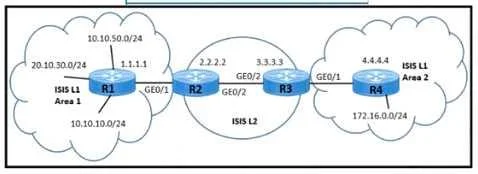
Refer to the exhibit. A network engineer must meet these requirements to provide a connects, solution: - The customer connected to Area 2 needs to access the application in Area 1 on the…
The correct answer is B. Set a tag value of 200 to match the summary address 10.0.0.0/16 on R3. C. Apply the route map for tag 200 and leak Level 2 routes into Level 1 Area 2 on R3. To selectively allow customer access to Area 1's 10.10.10.0/24 subnet, deny 20.10.30.0/24, and limit Area 2's routing table, the engineer must tag a summary address on R3 and then use a route map on R3 to leak only the tagged Level 2 routes into Level 1 Area 2.
Question
Refer to the exhibit. A network engineer must meet these requirements to provide a connects, solution:
- The customer connected to Area 2 needs to access the application in
Area 1 on the 10.10.10.0/24 subnet
- The Customer must not have access to the 20.10.30.0/24 subnet.
- The service provider must make sure that the Area 2 routing database
limits the number of IP addresses in the routing table. Which two configurations must be implemented to meet the requirements? (Choose two)
Exhibit
Options
- ASet a tag value of 200 to match the summary address 10.0.0/16 on R2.
- BSet a tag value of 200 to match the summary address 10.0.0.0/16 on R3.
- CApply the route map for tag 200 and leak Level 2 routes into Level 1 Area 2 on R3
- DApply the route map for tag 200 and teak Level 2 routes into Level 1 Area 2 on R4.
- ESet a tag value of 200 to match the summary address 10.0.0./16 on R1.
How the community answered
(33 responses)- A6% (2)
- B58% (19)
- D24% (8)
- E12% (4)
Why each option
To selectively allow customer access to Area 1's 10.10.10.0/24 subnet, deny 20.10.30.0/24, and limit Area 2's routing table, the engineer must tag a summary address on R3 and then use a route map on R3 to leak only the tagged Level 2 routes into Level 1 Area 2.
R2 is an internal router within Area 1; setting a tag there would not be effective for controlling route leaking from Level 2 to Level 1 Area 2, which occurs at the L1/L2 border router R3.
R3 acts as the Level 1/Level 2 router connecting Area 1 (Level 1) and the core (Level 2). Setting a tag of 200 on R3 for the summary address 10.0.0.0/16 (which includes 10.10.10.0/24) provides a mechanism to selectively identify and control specific routes.
After tagging the desired summary route on R3, applying a route map to leak only Level 2 routes that match tag 200 into Level 1 Area 2 on R3 achieves the stated requirements. This ensures the 10.10.10.0/24 subnet is accessible, 20.10.30.0/24 is excluded (as it won't be tagged), and Area 2's routing table is condensed to only essential summary routes.
R4 is an internal Level 1 router within Area 2, not a Level 1/Level 2 border router, and therefore is not responsible for leaking routes from Level 2 to Level 1 Area 2.
R1 is an internal router within Area 1; setting a tag on R1 would not influence the process of leaking Level 2 routes into Level 1 Area 2 from the L1/L2 border router R3.
Concept tested: ISIS route leaking, summarization, and route tagging for filtering
Source: https://www.cisco.com/c/en/us/td/docs/ios-xml/ios/iproute_isis/configuration/15-mt/irs-15-mt-book/irs-redistribute-and-route-leaking.html
Topics
Community Discussion
No community discussion yet for this question.