
350-501 · Question #164
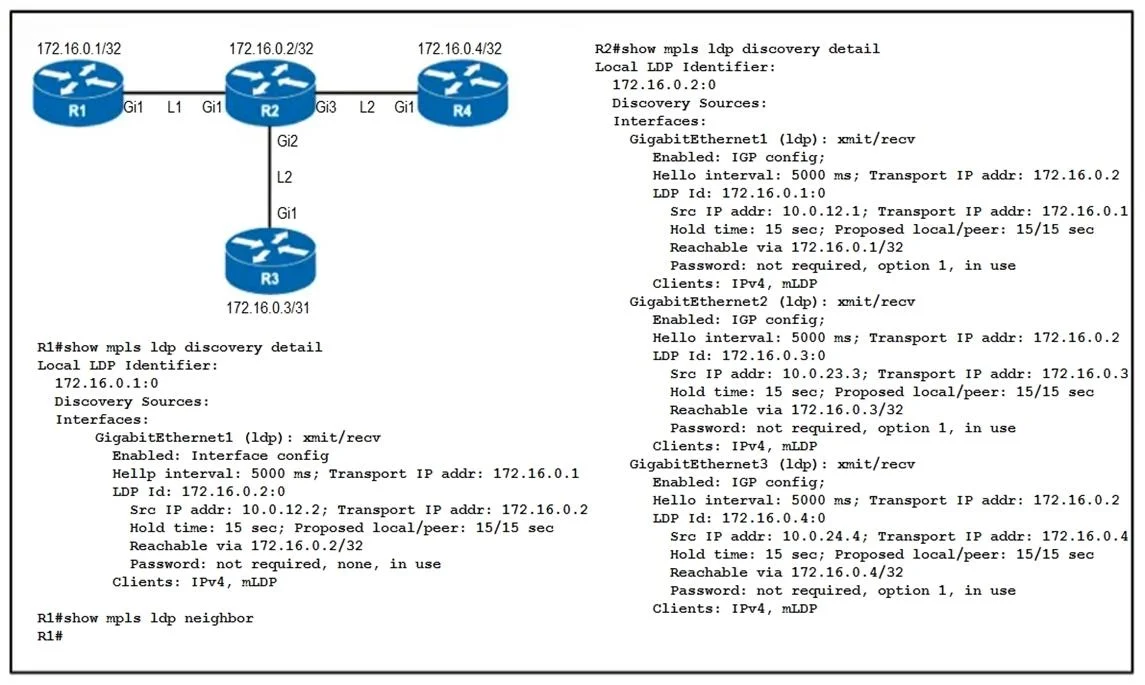
Refer to the exhibit. An engineer began to configure LDP between R1 and R2, but R1 and R2 cannot yet establish an LDP TCP connection. Which additional task must be completed to finish the…
The correct answer is C. Configure the no mpls Idp password option 1 command on R2. If LDP routers cannot establish a TCP connection, a common issue is a password mismatch, and disabling the password on one router (R2) if it was inadvertently configured, can resolve the problem.
Question
Refer to the exhibit. An engineer began to configure LDP between R1 and R2, but R1 and R2 cannot yet establish an LDP TCP connection. Which additional task must be completed to finish the implementation?
Exhibit
Options
- AConfigure the mpls Idp neighbor 172.16.0.1 password command on R1
- BConfigure the mpls Idp neighbor 10.0.12.1 password command on R1
- CConfigure the no mpls Idp password option 1 command on R2
- DConfigure the no mpls Idp password option 1 command on R1
How the community answered
(66 responses)- A3% (2)
- B11% (7)
- C79% (52)
- D8% (5)
Why each option
If LDP routers cannot establish a TCP connection, a common issue is a password mismatch, and disabling the password on one router (R2) if it was inadvertently configured, can resolve the problem.
The IP address 172.16.0.1 is not shown in the implied 10.0.12.x subnet, so configuring a neighbor password for this unknown IP on R1 is unlikely to solve the issue between R1 and R2.
The command `mpls ldp neighbor 10.0.12.1 password` on R1 would configure a password for R1's own interface or loopback if it's 10.0.12.1, which is incorrect as neighbor passwords are configured for the remote peer.
LDP neighbors establish a TCP session, and if a password is configured on one router (e.g., R2) but not on the other (R1), or if the passwords do not match, the TCP connection will fail. Removing the password configuration from R2 using `no mpls ldp password option 1` (or the appropriate command to remove the password) would resolve this mismatch, allowing the LDP TCP session to establish with R1.
If R1 is having trouble connecting to R2, and R2 is configured with a password, removing the password from R1 would only resolve the issue if R1 *was* configured with a password and R2 *was not*, or they mismatched. Given the options, removing it from R2 is implied to be the corrective action.
Concept tested: LDP adjacency troubleshooting password mismatch
Source: https://www.cisco.com/c/en/us/td/docs/ios/mpls/configuration/guide/mp_ldp_pswds.html
Topics
Community Discussion
No community discussion yet for this question.