nerdexam
CiscoCisco

350-401 · Question #951

350-401 Question #951: Real Exam Question with Answer & Explanation

This lab simulation tests hands-on configuration of multiple advanced network features: SPAN (Switched Port Analyzer) for traffic monitoring, EEM (Embedded Event Manager) for automated interface recovery, and NetFlow Top Talkers for traffic analysis. The correct approach requires

Submitted by weili_xi· Mar 6, 2026Infrastructure Automation and Programmability / Network Management and Monitoring - tests advanced CLI configuration skills for traffic analysis (SPAN, NetFlow) and event-driven automation (EEM) commonly assessed in CCNP Enterprise (ENCOR 350-401) and advanced Cisco certification exams.

Question

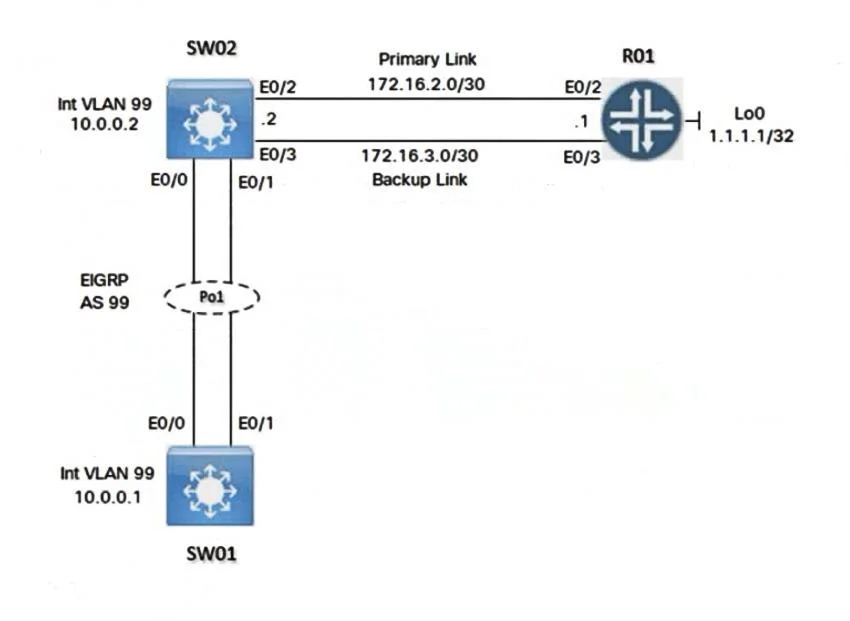
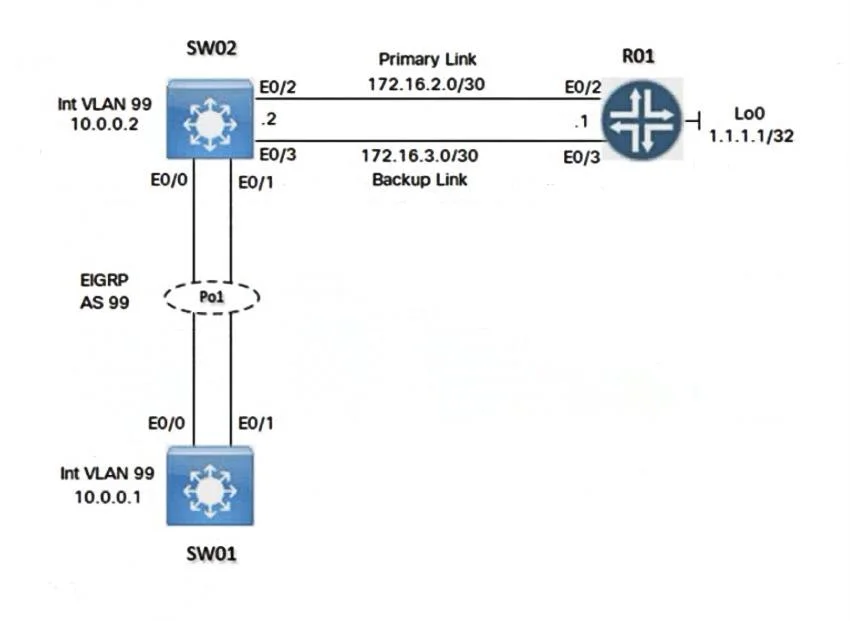
Lab Simulation 7 Guidelines This is a lab item in which tasks will be performed on virtual devices. - Refer to the Tasks tab to view the tasks for this lab item. - Refer to the Topology tab to access the device console(s) and perform the tasks. - Console access is available for all required devices by clicking the device icon or using the tab(s) above the console window. - All necessary preconfigurations have been applied. - Do not change the enable password or hostname for any device. - Save your configurations to NVRAM before moving to the next item. - Click Next at the bottom of the screen to submit this lab and move to the next question. - When Next is clicked, the lab closes and cannot be reopened. Topology Tasks Configure the devices according to the topology to achieve these goals: 1. Configure a SPAN session on SW01 using these parameters: • Session Number: 20 • Source Interface: VLAN 99 • Traffic Direction: Transmitted Traffic • Destination Interface: Ethernet 0/1 2. Configure the NetFlow Top Talkers feature for outbound traffic on interface E0/2 of R01 with these parameters: • Number of Top Talkers: 50 • Sort Type: Packets • Cache Timeout: 30 seconds 3. Configure an IP SLA operation on SW02 and start the ICMP probe with these parameters: • Entry Number: 10 • Target IP: 1.1.1.1 • Source IP: 172.16.2.2 • Frequency: 5 seconds • Threshold: 250 milliseconds • Timeout: 3000 milliseconds • Lifetime: Forever Answer: Task 1. Configure a SPAN session on SW01 Configure SPAN There are 3 types of SPAN: Local SPAN, remote SPAN and Encapsulated remote SPAN (ERSPAN). This question asks about Local SPAN configuration. For Local SPAN, the configuration is quite simple. The configuration below capture outgoing traffic on VLAN 99 and send to E0/1 on the same switch: SW1(config)# monitor session 20 source vlan 99 tx //tx means transmitted traffic SW1(config)# monitor session 20 destination interface Ethernet0/1 Note: Maybe the destination interface of SPAN is not E0/1 as it is a membership of an Etherchannel port. Verification SW1&SW2#sh monitor session 20 Task 2. Configure the NetFlow Top Talkers feature for outbound traffic on interface E0/2 of R01 (Number of Top Talkers: 50; Sort Type: Packets; Cache Timeout: 30 seconds) Configure Top Talker feature R1(config)#ip flow-top-talkers //Configure top-talkers feature on E0/0 R1(config-flow-top-talkers)#top 50 //number of top talkers shown (collect data on the 50 highest users flowing through the router) R1(config-flow-top-talkers)#sort-by packets (can be sorted by bytes or packets) R1(config-flow-top-talkers)# cache-timeout 30000 //notice that this is in milliseconds, not seconds R1(config)#exit R1(config)#interface Ethernet 0/2 R1(config-if)#ip flow egress//outbound traffic Task 3. Configure IP SLA: SW02(config)# ip sla 10 SW02(config-ip-sla)# icmp-echo 1.1.1.1 source-ip 172.16.2.2 SW02(config-ip-sla-echo)# frequency 5 SW02(config-ip-sla-echo)# threshold 250 SW02(config-ip-sla-echo)# timeout 3000 SW02(config-ip-sla-echo)#exit SW02(config-ip-sla)#exit SW02(config)# ip sla schedule 10 life forever start-time now Note: + Timeout (in milliseconds) sets the amount of time an IP SLAs operation waits for a response from its request packet. In other words, the timeout specifies how long the router should wait for a response to its ping before it is considered failed. + Threshold (in milliseconds too) sets the upper threshold value for calculating network monitoring statistics created by an IP SLAs operation. + The frequency is the rate (in seconds) at which this IP SLA operation repeats. Save the configuration R1,SW01,SW02#copy running-config startup-config

Options

  • task1. Configure an EEM applet on LAB-RTR-01 that will automatically re-enable interface Loopback0 if it is administratively shut down. 2. Configure the devices according to the topology to achieve these goals: Configure a SPAN session on SW01 (Session Number: 20, Source Interface: VLAN 99, Traffic Direction: Transmitted Traffic, Destination Interface: Ethernet0/1); Configure the NetFlow Top Talkers feature for outbound traffic on interface E0/2 of R01 (Number of Top Talkers: 50, Sort Type: Packets, Cache Timeout: 30 seconds); Configure an IP SLA operation on SW02 and start the ICMP probe (Entry Number: 10, Target IP: 1.1.1.1, Source IP: 172.16.2.2, Frequency: 5 seconds, Threshold: 250 milliseconds, Timeout: 3000 milliseconds, Lifetime: Forever).
  • prerequisitesConsole access is available for all required devices.

Explanation

This lab simulation tests hands-on configuration of multiple advanced network features: SPAN (Switched Port Analyzer) for traffic monitoring, EEM (Embedded Event Manager) for automated interface recovery, and NetFlow Top Talkers for traffic analysis. The correct approach requires entering specific CLI commands on each device - for SPAN: 'monitor session 20 source vlan 99 tx' and 'monitor session 20 destination interface ethernet 0/1' on SW01; for EEM: an applet using an 'event syslog' or 'event interface' trigger with an action to issue 'no shutdown' on Loopback0; and for NetFlow: enabling 'ip flow egress' on E0/2 with 'ip flow-top-talkers top 50 sort-by bytes'. These configurations must be saved to NVRAM using 'copy running-config startup-config' or 'write memory' before proceeding.

Topics

#SPAN/RSPAN Traffic Monitoring#Embedded Event Manager (EEM)#NetFlow Top Talkers#Network Automation and Troubleshooting

Community Discussion

No community discussion yet for this question.

Full 350-401 PracticeBrowse All 350-401 Questions