
350-401 · Question #941
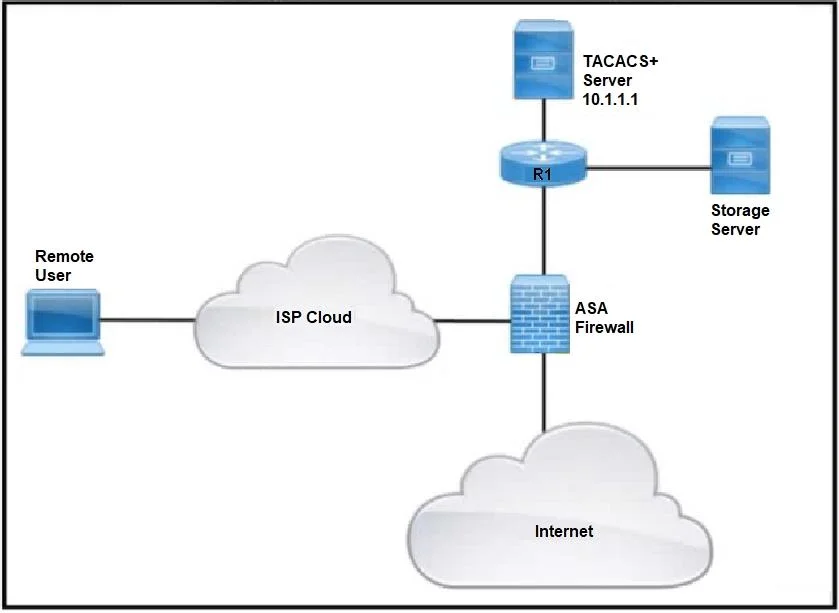
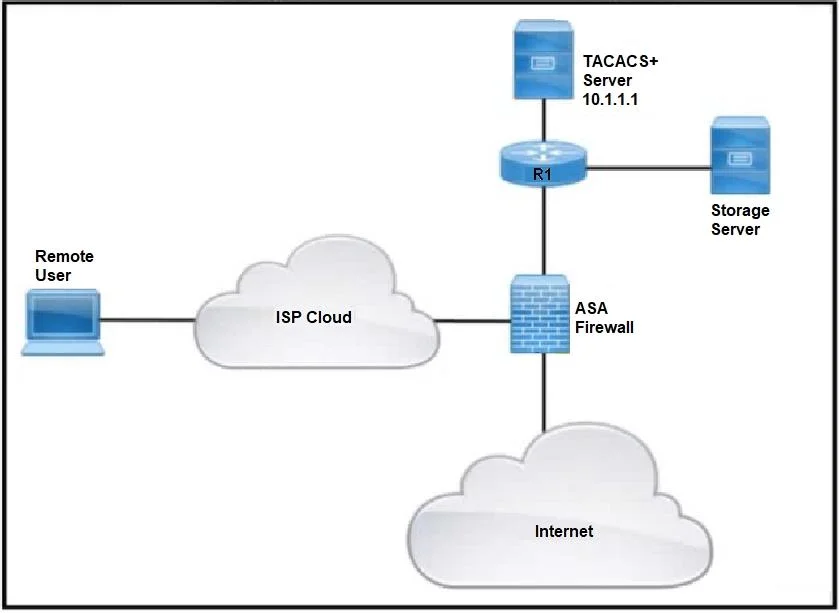
Refer to the exhibit. Remote users cannot access the Internet but can upload files to the storage server. Which configuration must be applied to allow Internet access?
The correct answer is B. ciscoasa(config)# access-list MAIL_AUTH extended permit tcp any any eq www. To allow remote users Internet access through a Cisco ASA, an access-list must permit outbound HTTP traffic (TCP port 80).
Question
Exhibits
Options
- Aciscoasa(config)# access-list MAIL_AUTH extended permit udp any any eq http
- Bciscoasa(config)# access-list MAIL_AUTH extended permit tcp any any eq www
- Cciscoasa(config)# access-list MAIL_AUTH extended permit tcp any any eq http
- Dciscoasa(config)# access-list HTTP_AUTH extended permit udp any any eq http
How the community answered
(36 responses)- A14% (5)
- B75% (27)
- C8% (3)
- D3% (1)
Why each option
To allow remote users Internet access through a Cisco ASA, an access-list must permit outbound HTTP traffic (TCP port 80).
This command permits UDP traffic, but HTTP, which is fundamental for Internet access, primarily uses TCP, not UDP.
The `access-list MAIL_AUTH extended permit tcp any any eq www` command permits TCP traffic from any source to any destination using the 'www' service alias (TCP port 80), which is essential for basic web browsing and Internet access.
This command permits TCP traffic using the 'http' service alias, which also refers to TCP port 80, but `www` is a commonly used equivalent in Cisco ACLs, and if only one correct answer is allowed, B is the chosen correct answer.
This command permits UDP traffic and uses a different access-list name, both of which are incorrect for enabling standard HTTP Internet access; HTTP uses TCP, and the access-list name likely needs to match existing policy.
Concept tested: Cisco ASA access-list for HTTP traffic
Source: https://www.cisco.com/c/en/us/td/docs/security/asa/asa90/configuration/guide/asa_90_cli_config/fw_acl.html#wp1080646
Topics
Community Discussion
No community discussion yet for this question.