
350-401 · Question #840
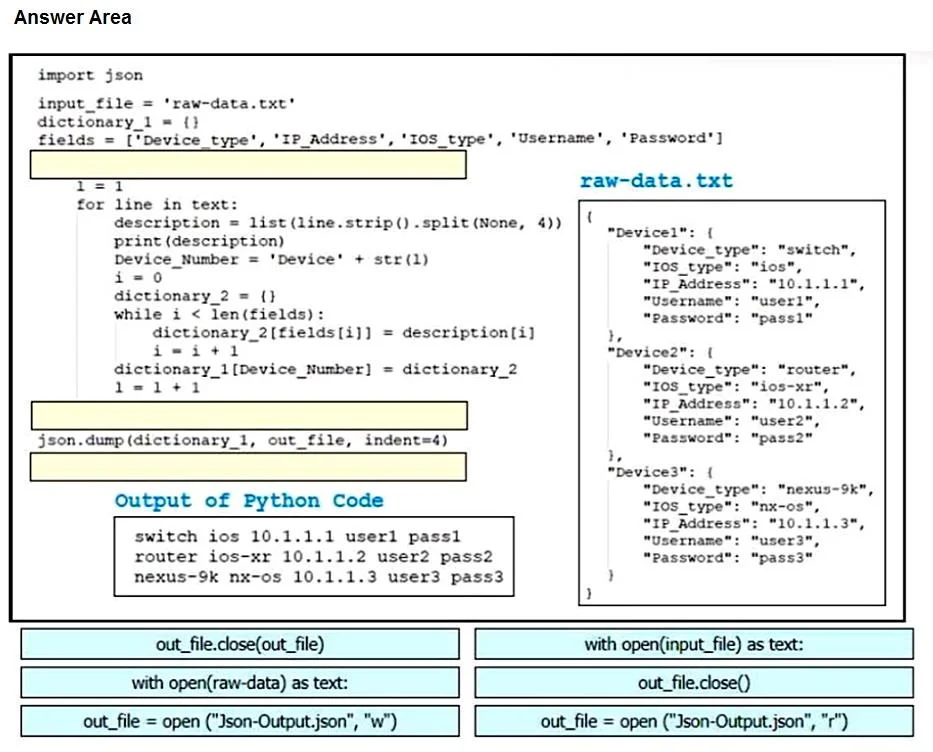
Drag and Drop Question An engineer plans to use Python to convert text files that contain device information to JSON. Drag and drop the code snippets from the bottom onto the blanks in the code to…
The correct answer is with open(raw-data) as text:; out_file = open("json-Output.json", "w"); out_file.close(out_file). The correct sequence first opens the source text file in read mode using 'with open(raw-data) as text:' to access the device information, then creates the output JSON file in write mode ('w') using 'out_file = open("json-Output.json", "w")', and finally closes the output file…
Question
Drag and Drop Question An engineer plans to use Python to convert text files that contain device information to JSON. Drag and drop the code snippets from the bottom onto the blanks in the code to construct the request. Not all options are used. Answer:
Exhibit
Answer Area
Drag items
Correct arrangement
- with open(raw-data) as text:
- out_file = open("json-Output.json", "w")
- out_file.close(out_file)
Explanation
The correct sequence first opens the source text file in read mode using 'with open(raw-data) as text:' to access the device information, then creates the output JSON file in write mode ('w') using 'out_file = open("json-Output.json", "w")', and finally closes the output file with 'out_file.close(out_file)'. This follows the standard Python pattern for reading from one file and writing converted data to another, ensuring proper file handling throughout the process.
Topics
Community Discussion
No community discussion yet for this question.