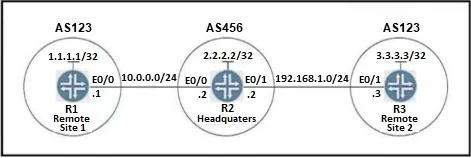
Lab Simulation 1 Guidelines This is a lab item in which tasks will be performed on virtual devices. - Refer to the Tasks tab to view the tasks for this lab item. - Refer to the Topology tab to…
To enable communication between Remote Site 1 and Remote Site 2 (both in AS123) through Headquarters (R2 in AS456), R2 must be configured with the as-override command for its neighbor R3, which will modify the BGP AS_PATH attribute to bypass the default BGP loop prevention…
Submitted by sofia.br· Mar 6, 2026
Question
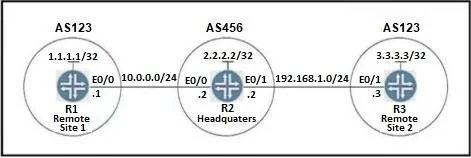
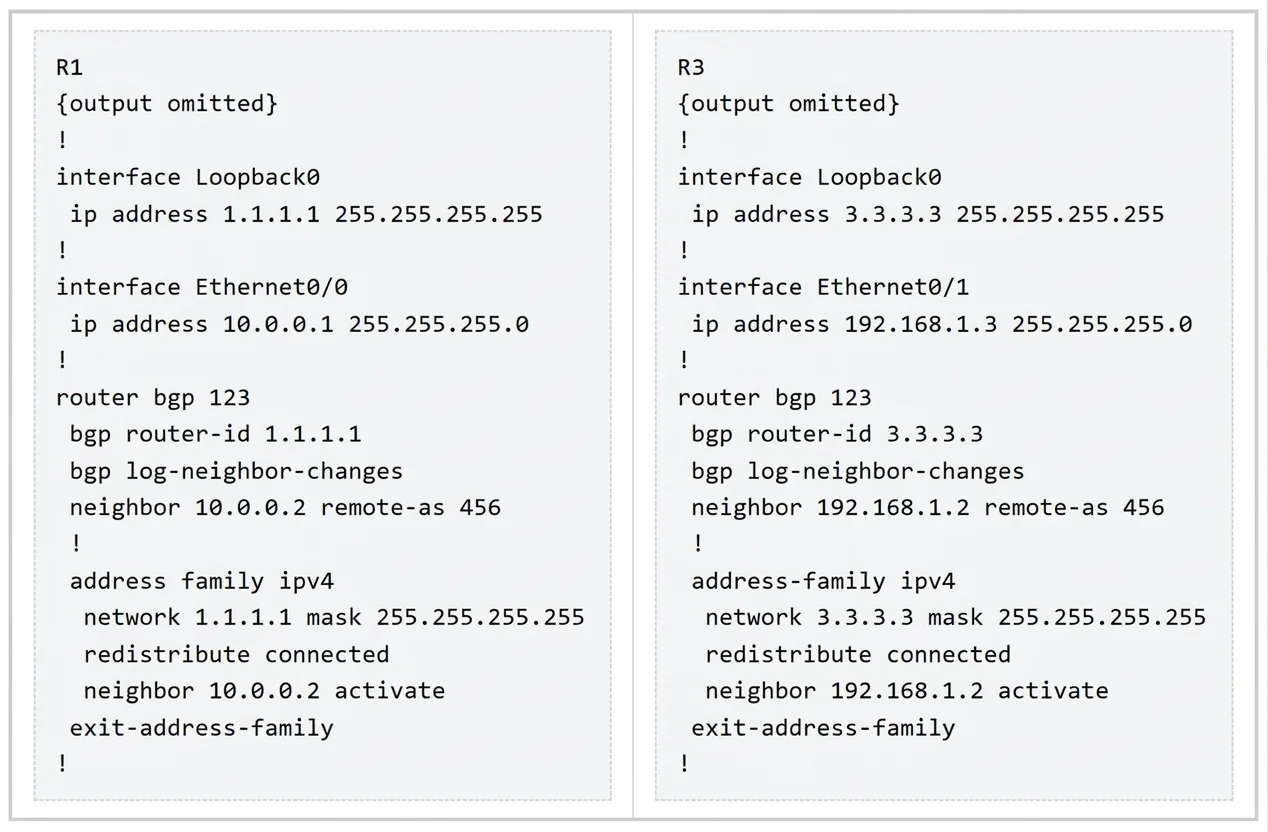
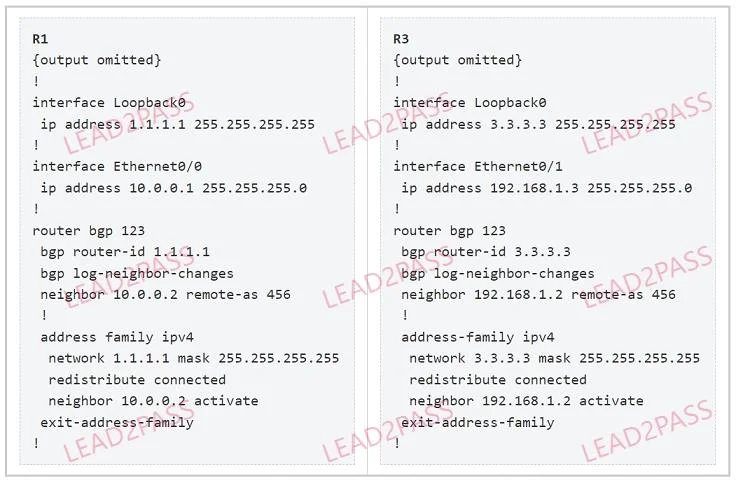
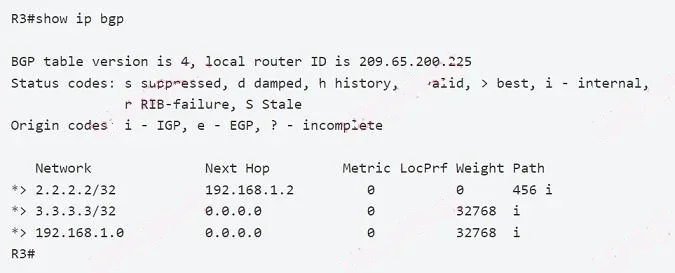
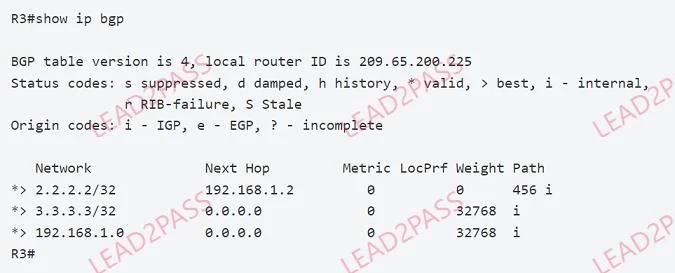
Lab Simulation 1 Guidelines This is a lab item in which tasks will be performed on virtual devices. - Refer to the Tasks tab to view the tasks for this lab item. - Refer to the Topology tab to access the device console(s) and perform the tasks. - Console access is available for all required devices by clicking the device icon or using the tab(s) above the console window. - All necessary preconfigurations have been applied. - Do not change the enable password or hostname for any device. - Save your configurations to NVRAM before moving to the next item. - Click Next at the bottom of the screen to submit this lab and move to the next question. - When Next is clicked, the lab closes and cannot be reopened. Topology Tasks BGP connectivity exists between Headquarters and both remote sites, however Remote Site 1 cannot communicate with Remote Site 2. Configure BGP according to the topology to achieve these goals: 1. Configure R2 under the BGP process to provide reachability between Remote Site 1 and Remote Site 2. No configuration changes are permitted on R1 or R3. 2. Ensure that the /32 networks at Remote Site 1 and Remote Site 2 can ping each other. Initial Configs (Note: Maybe there are two versions of this sim. In the first version, R2 cannot be accessible and unnecessary configs have been removed. We will solve this version first.) If we use the "show ip bgp" command on R3 then we will see the Loopback0 interface of R1 is not learned since it is coming from same AS number 123. Answer: In order to allow same AS prefix to be received from eBGP neighbor and installed in BGP table, R1 can use the "allowas-in" command will as below: R1(config)#router bgp 123 R1(config-router)#address-family ipv4 R1(config-router-af)#neighbor 10.0.0.2 allowas-in Same configuration should be applied to R3: R3(config)#router bgp 123 R3(config-router)#address-family ipv4 R3(config-router-af)#neighbor 192.168.1.2 allowas-in Note: In the second version of this sim, only R2 can be accessible so the above commands cannot be applied to R1 & R3. In that case we have to use "as-override" on R2 as follows: R2(config)#router bgp 456 R2(config-router)#address-family ipv4 R2(config-router-af)#neighbor 10.0.0.1 as-override R2(config-router-af)#neighbor 192.168.1.3 as-override With "as-override" configured, R3 would accept routes advertised from R1 (and vice versa) as the AS 123 was replaced by AS 456 in the AS_PATH. R3 will see the AS_PATH "456 456 i" (instead of "123 456 i"). Since the AS_PATH does not contain its own AS number so it accepts the advertised routes. You can practice this version (AS-Override) with our own simulator at BGP Configuration online simulator v2. This version does not work with EVE-NG as AS-Override feature requires a VRF so we did not create a lab file in EVE-NG. Verification R1,R3#show ip bgp -> see Loopback0 of remote routers. R1 must ping Loopback0 of R3 successfully. Save the configuration Don't forget to save the configuration on R1 & R3 R1, R3#copy running-config startup-config In the second version, only R2 was configured so save its configuration: R2#copy running-config startup-config
Exhibits
Explanation
To enable communication between Remote Site 1 and Remote Site 2 (both in AS123) through Headquarters (R2 in AS456), R2 must be configured with the as-override command for its neighbor R3, which will modify the BGP AS_PATH attribute to bypass the default BGP loop prevention mechanism.
Approach. The correct interaction is to access the console for R2 and apply the following configuration:
After applying this command, BGP will reconverge, and R3 will receive the 1.1.1.1/32 route from R1, and R1 will receive the 3.3.3.3/32 route from R3, thereby enabling full reachability between the two remote sites.
Common mistakes.
common_mistake. 1. Attempting to configure R1 or R3.
Using neighbor allowas-in on R2 or R3.
Configuring next-hop-self on R2.
Redistributing routes on R2.
reason. 1. Configuring R1 or R3: The lab guidelines explicitly state, 'No configuration changes are permitted on R1 or R3.' Any attempt to do so would result in failing the lab item.
Using neighbor allowas-in: This command is typically configured on the receiving router (R3 in this case) to accept routes that contain its own AS in the AS_PATH. However, the problem statement mandates that only R2 can be configured, making allowas-in on R3 an invalid option. If configured on R2 for R1 or R3, it wouldn't resolve the issue of R2 suppressing advertisements to R3 based on AS_PATH.
Configuring next-hop-self on R2: This command ensures that the advertising router's IP address is used as the next hop for routes advertised to iBGP peers. While often necessary in iBGP setups, it does not address the eBGP AS_PATH loop prevention mechanism at play here.
Redistributing routes on R2: While R2 could theoretically redistribute the routes into another routing protocol or directly into BGP, this is an inefficient and generally discouraged practice for solving BGP AS_PATH issues. It also doesn't directly address the BGP loop prevention mechanism and can introduce other complexities or sub-optimal routing paths. The as-override command is the clean and standard BGP solution for this specific problem.
Concept tested. The core technical concepts being tested are BGP loop prevention mechanisms, specifically the role of the AS_PATH attribute in eBGP, and the functionality of the as-override command to allow transit routing through an intermediate AS between two segments of the same remote AS. This scenario highlights the need to understand how BGP handles route advertisements when an external AS acts as a hub for multiple spokes belonging to the same AS.