
350-401 · Question #514
Drag and Drop Question Drag and drop the snippets onto the blanks within the code to construct a script that changes the routing from gateway 1 to gateway 2 from 11:00 p.m. to 12:00 a.m. (2300 to…
The correct answer is ***; 10***; event timer; 111; daily; event tag; 10***; ***. Explanation: Time-Based Routing Script (2300–2400 Daily) This question builds a Cisco EEM (Embedded Event Manager) applet - a script embedded in IOS that triggers actions based on events, including time-based (cron-style) timers. The goal is two events: activate Gateway 2 at…
Question
Drag and Drop Question Drag and drop the snippets onto the blanks within the code to construct a script that changes the routing from gateway 1 to gateway 2 from 11:00 p.m. to 12:00 a.m. (2300 to 2400) only, daily. Not all options are used, and some options may be used twice. Answer:
Exhibit
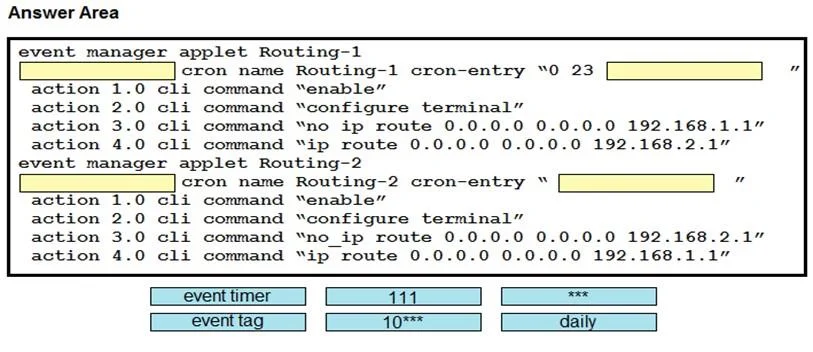
Answer Area
Drag items
Correct arrangement
- 10***
- event timer
- 111
- daily
- event tag
- 10***
Explanation
Explanation: Time-Based Routing Script (2300–2400 Daily)
This question builds a Cisco EEM (Embedded Event Manager) applet - a script embedded in IOS that triggers actions based on events, including time-based (cron-style) timers. The goal is two events: activate Gateway 2 at 23:00 and deactivate (restore Gateway 1) at 00:00, every day.
Reconstructed Script Structure
The 8 blanks fill two parallel event declarations:
[1: ***] [2: 10***] event timer [4: 111] daily event tag [7: 10***] [8: ***]
Think of it as two mirrored event lines sharing parameters.
Item-by-Item Breakdown
Position 1 - ***
These are cron wildcards (i.e., * * *) representing day-of-month, month, and day-of-week in a cron entry - meaning "every day, every month, any weekday." This anchors the first timer to a universal recurring schedule.
Position 2 - 10***
This is a masked time/cron prefix (likely 10 + cron fields, or a partial time stamp such as a minute/hour specification). It identifies when within the day the first event fires - part of the 23:00 trigger specification.
Position 3 - event timer
This is the EEM keyword declaring a timer-type event. It tells IOS this applet fires based on a clock/cron schedule rather than a syslog message, interface state, or CLI input. It must precede the timer parameters.
Position 4 - 111
Likely a sequence number or timer identifier within the applet. EEM applets use numeric IDs to order and reference events. 111 identifies this specific timer instance so later actions can reference it.
Position 5 - daily
Specifies the recurrence of the schedule - this event fires every day, not just once. This is what makes the routing change automatic and recurring rather than a one-time task.
Position 6 - event tag
The event tag keyword labels an event so that it can be referenced by a trigger correlate statement or used in multi-event applets. This is the second event declaration (the 00:00 cutoff), and it must be tagged so the script can distinguish between the start-of-change and end-of-change events.
Position 7 - 10***
Reused from Position 2 - same time/cron prefix parameter, now applied to the second event (midnight / 00:00). The reuse is intentional: both the 23:00 and 00:00 triggers share structural cron parameters (wildcards for day/month/weekday differ only in the hour field).
Position 8 - ***
Reused from Position 1 - the same cron wildcards (* * *) close out the second event's cron entry, confirming it also fires daily with no day/month/weekday restrictions.
Why the Mirrored Structure?
| Position | Item | Role |
|---|---|---|
| 1, 8 | *** | Cron wildcards - "any day/month/weekday" |
| 2, 7 | 10*** | Time-specific cron prefix (shared by both events) |
| 3 | event timer | Declares timer-type event (the ON trigger) |
| 4 | 111 | Timer/sequence ID |
| 5 | daily | Recurrence qualifier |
| 6 | event tag | Labels the second event (the OFF trigger) |
Common Mistakes
- Swapping
event timerandevent tag:event timerdefines the type of event (clock-based);event taglabels an event for correlation. They are not interchangeable. - Placing
dailybeforeevent timer:dailyqualifies the recurrence of the schedule; it must follow the event type declaration, not precede it. - Using
111as a time value: It is a sequence/ID, not 11:00 PM. The actual time is encoded in the cron fields (10***and***). - Assuming all items are used once: The question explicitly states some options are used twice -
***(positions 1 & 8) and10***(positions 2 & 7) appear in both event declarations.
Topics
Community Discussion
No community discussion yet for this question.