
350-401 · Question #262
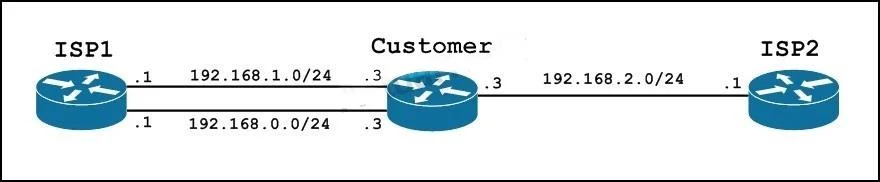
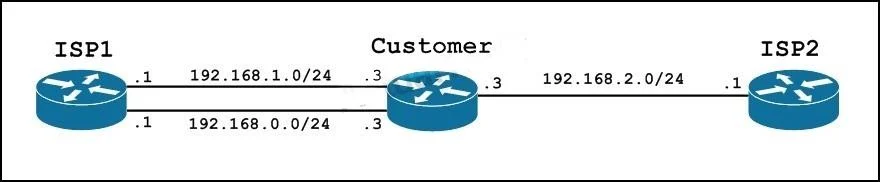
Refer to the exhibit. The customer wants to use IP SLA to create a failover to ISP2 when both Ethernet connections to ISP1 are down. The customer also requires that both connections to ISP1 are…
The correct answer is C. ip route 0.0.0.0 0.0.0.0 192.168.0.1 track 1. To utilize both ISP1 connections while enabling failover to ISP2 when ISP1 links are down, multiple static routes are used: two primary routes for ISP1 with the same administrative distance and IP SLA tracking, and a backup route for ISP2 with a higher administrative distance.
Question
Refer to the exhibit. The customer wants to use IP SLA to create a failover to ISP2 when both Ethernet connections to ISP1 are down. The customer also requires that both connections to ISP1 are utilized during normal operations. Which IP route configuration accomplishes these requirements for the customer?
Exhibits
Options
- Aip route 0.0.0.0 0.0.0.0 192.168.0.1 track 1
- Bip route 0.0.0.0 0.0.0.0 192.168.0.1 track 1
- Cip route 0.0.0.0 0.0.0.0 192.168.0.1 track 1
- Dip route 0.0.0.0 0.0.0.0 192.168.0.1 track 1 1
How the community answered
(45 responses)- A4% (2)
- B20% (9)
- C64% (29)
- D11% (5)
Why each option
To utilize both ISP1 connections while enabling failover to ISP2 when ISP1 links are down, multiple static routes are used: two primary routes for ISP1 with the same administrative distance and IP SLA tracking, and a backup route for ISP2 with a higher administrative distance.
The command `ip route 0.0.0.0 0.0.0.0 192.168.0.1 track 1` implies using the default administrative distance of 1, which is functionally similar to C but less explicit if an explicit AD is preferred or required by convention.
This option is identical to A in functionality and doesn't explicitly set the administrative distance like C does.
To meet the requirements, multiple static routes are needed: two `ip route` commands for ISP1's two connections, each with the same administrative distance (explicitly `1` here) and tracked by a separate IP SLA object. This allows load balancing over ISP1 and enables failover when both tracked ISP1 links fail, making a higher administrative distance route to ISP2 active. The syntax `track 1 1` explicitly sets the administrative distance for this specific route to 1, while tracking IP SLA object 1.
This option is identical to A and B in functionality, implying the default administrative distance of 1 rather than explicitly setting it like C.
Concept tested: IP SLA static route tracking and failover
Source: https://www.cisco.com/c/en/us/td/docs/ios/ipapp/configuration/guide/ipapp_c/iap_ipsla.html
Topics
Community Discussion
No community discussion yet for this question.