
350-401 · Question #172
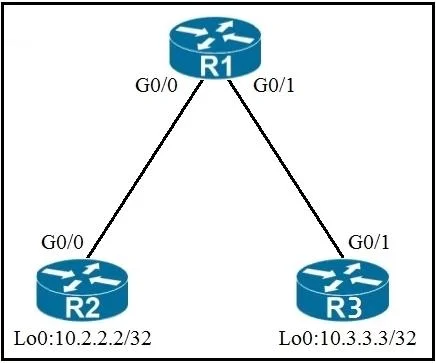
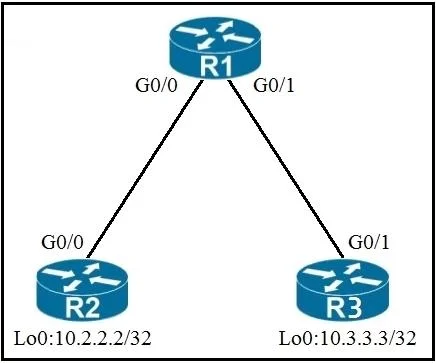
Refer to the exhibit. An engineer must deny Telnet traffic from the loopback interface of router R3 to the loopback interface of router R2 during the weekend hours. All other traffic between the…
The correct answer is B. R1(config)#time-range WEEKEND. Explanation Option B is correct because the ACL blocking Telnet traffic should be applied on R1, the transit router between R3 and R2, and the time-range WEEKEND command must be configured on the same device where the ACL referencing it will be applied - R1 is the optimal…
Question
Refer to the exhibit. An engineer must deny Telnet traffic from the loopback interface of router R3 to the loopback interface of router R2 during the weekend hours. All other traffic between the loopback interfaces of routers R3 and R2 must be allowed at all times. Which command accomplish this task?
Exhibits
Options
- AR3(config)#time-range WEEKEND
- BR1(config)#time-range WEEKEND
- CR3(config)#time-range WEEKEND
- DR1(config)#time-range WEEKEND
How the community answered
(32 responses)- A16% (5)
- B75% (24)
- C6% (2)
- D3% (1)
Explanation
Explanation
Option B is correct because the ACL blocking Telnet traffic should be applied on R1, the transit router between R3 and R2, and the time-range WEEKEND command must be configured on the same device where the ACL referencing it will be applied - R1 is the optimal placement point to filter traffic flowing between the two loopback interfaces. Options A and C are incorrect because placing the time-range (and corresponding ACL) on R3 would require an outbound ACL on R3's loopback interface, which is generally not effective since Cisco routers do not filter traffic originated from the router itself using outbound ACLs on loopback interfaces. Options B and D appear similar, but the distinction lies in the full ACL configuration accompanying the time-range - option D likely references an incorrect ACL syntax or interface placement that doesn't properly deny only Telnet (port 23) traffic while permitting all other traffic. The key principle here is that the time-range must be defined on the same router where the ACL using that time-range is applied.
Memory Tip
"Time-range lives where the ACL lives" - always configure your time-range on the router where the corresponding ACL will be applied. Think of the time-range as an attachment to the ACL; they must coexist on the same device to function.
Topics
Community Discussion
No community discussion yet for this question.