
350-401 · Question #1112
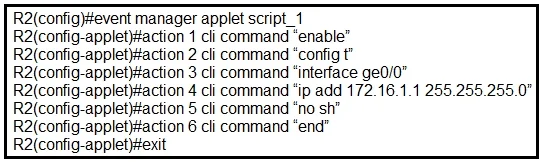
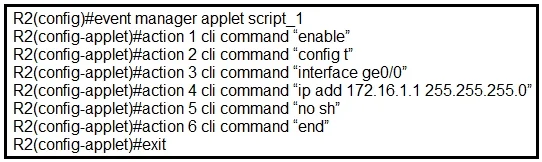
Refer to the exhibit. An engineer must create a manually triggered EEM applet to enable the R2 router interface and assign an IP address to it. What is required to complete this configuration?
The correct answer is D. R2(config-applet)# event none sync yes. To create a manually triggered EEM applet, the event none sync yes command is required, allowing the applet to be executed on demand.
Question
Exhibits
Options
- AR2(config-apple)#action 4 cli command "ip add 172.16.1.1 0.0.0.255"
- BR2(config)# event manager session cli username
- CR2(config-applet)# event oir
- DR2(config-applet)# event none sync yes
How the community answered
(18 responses)- A6% (1)
- C11% (2)
- D83% (15)
Why each option
To create a manually triggered EEM applet, the `event none sync yes` command is required, allowing the applet to be executed on demand.
The IP address configuration syntax `ip add 172.16.1.1 0.0.0.255` is incorrect; a subnet mask (e.g., 255.255.255.0), not a wildcard mask, is typically used for the `ip address` command.
`event manager session cli username` is for configuring the user context under which the EEM applet executes CLI commands, not for defining the applet's trigger type.
`event oir` triggers the applet based on an Online Insertion and Removal event, which is an automatic trigger, not a manual one as required by the question.
The command `event none sync yes` defines an EEM applet that is not triggered by a specific event but rather manually initiated, and `sync yes` ensures the applet runs synchronously, waiting for its completion before returning control. This is the correct configuration for a manually triggered EEM applet, enabling on-demand execution.
Concept tested: EEM manually triggered applets
Source: https://www.cisco.com/c/en/us/td/docs/ios-xml/ios/eem/configuration/15-mt/eem-15-mt-book/eem-intro.html#GUID-59A65D39-5E91-4560-A6E9-44671F292B9C
Topics
Community Discussion
No community discussion yet for this question.