
350-401 · Question #1108
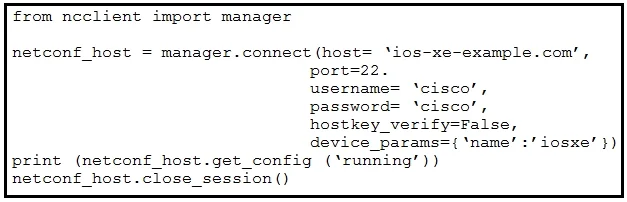
Refer to the exhibit. An engineer deploys a script to retrieve the running configuration from a NETCONF-capable Cisco IOS XE device that is configured with default settings. The script fails. Which…
The correct answer is B. port=830. To successfully establish a NETCONF session, the script must explicitly specify port 830, which is the standard TCP port for NETCONF over SSH.
Question
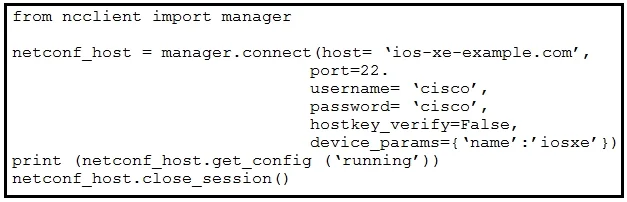
Refer to the exhibit. An engineer deploys a script to retrieve the running configuration from a NETCONF-capable Cisco IOS XE device that is configured with default settings. The script fails. Which configuration must be applied to retrieve the configuration using NETCONF?
Exhibits
Options
- Aprint (netconf_host.get_config('show running'))
- Bport=830
- Cdevice_params=('name':'los-xe'})
- Dhostkey_verify=True,
How the community answered
(64 responses)- A5% (3)
- B84% (54)
- C8% (5)
- D3% (2)
Why each option
To successfully establish a NETCONF session, the script must explicitly specify port 830, which is the standard TCP port for NETCONF over SSH.
`print (netconf_host.get_config('show running'))` is a Python code snippet for retrieving configuration once a connection is established, not a configuration fix for an initial connection failure.
NETCONF over SSH uses TCP port 830 as its standard default. If a script attempting to connect to a NETCONF-capable device does not explicitly specify this port, it will likely default to the standard SSH port (22), causing the NETCONF session establishment to fail.
`device_params={'name':'ios-xe'}}` is used by some NETCONF libraries to inform the connection about the device type for proper XML handling, but it does not address a fundamental connection issue like an incorrect port.
`hostkey_verify=True` is a security parameter for SSH host key verification; while important, it is not the primary reason a NETCONF connection would fail if the port itself is incorrect.
Concept tested: NETCONF default port and connection parameters
Source: https://datatracker.ietf.org/doc/html/rfc6242
Topics
Community Discussion
No community discussion yet for this question.