
350-401 · Question #1089
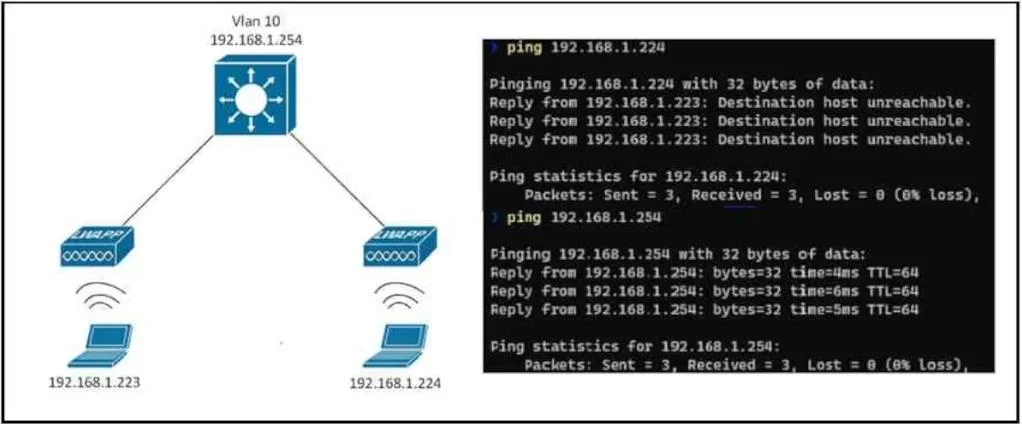
Refer to the exhibit. An SSID is configured and both clients can reach their gateways on the Layer 3 switch, but they cannot communicate with each other. Which action resolves this issue?
The correct answer is B. Set the P2P Blocking Action to Disabled. When wireless clients on the same SSID can reach their gateway but not each other, peer-to-peer (P2P) blocking is likely enabled, and disabling it will allow client communication.
Question
Refer to the exhibit. An SSID is configured and both clients can reach their gateways on the Layer 3 switch, but they cannot communicate with each other. Which action resolves this issue?
Exhibits
Options
- ASet the WMM Policy to Allowed
- BSet the P2P Blocking Action to Disabled
- CSet the WMM Policy to Required
- DSet the P2P Blocking Action to Forward-UpStream
How the community answered
(32 responses)- A3% (1)
- B84% (27)
- C3% (1)
- D9% (3)
Why each option
When wireless clients on the same SSID can reach their gateway but not each other, peer-to-peer (P2P) blocking is likely enabled, and disabling it will allow client communication.
Setting the Wi-Fi Multimedia (WMM) Policy to Allowed or Required relates to QoS and traffic prioritization, not client-to-client communication blocking.
The scenario describes clients on the same SSID being unable to communicate with each other, which is a classic symptom of peer-to-peer (P2P) blocking being enabled on the wireless access point or controller. Disabling the P2P Blocking Action setting allows direct communication between clients associated with the same SSID.
Setting the Wi-Fi Multimedia (WMM) Policy to Allowed or Required relates to QoS and traffic prioritization, not client-to-client communication blocking.
Setting P2P Blocking Action to Forward-UpStream means client-to-client traffic is forwarded to the upstream device for processing, which still prevents direct peer-to-peer communication on the local segment.
Concept tested: Wireless client-to-client communication (P2P blocking)
Source: https://www.cisco.com/c/en/us/td/docs/wireless/controller/8-5/config-guide/b_cg85/wireless_lan_configuration.html
Topics
Community Discussion
No community discussion yet for this question.