
350-401 · Question #443
Which line must be added in the Python function to return the JSON object {"cat_9k": "FXS1932Q2SE")?
The correct answer is A. return (json.dumps({d['hostname']: d['serialNumber'] for d in json.loads(test_json)['response']})). To transform a JSON string into a specific JSON object, the Python function must parse the input, extract the required key-value pairs using a dictionary comprehension, and then serialize the resulting dictionary back to a JSON string.
Question
Which line must be added in the Python function to return the JSON object {"cat_9k":
"FXS1932Q2SE")?
Exhibits
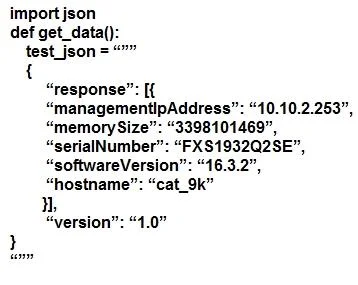
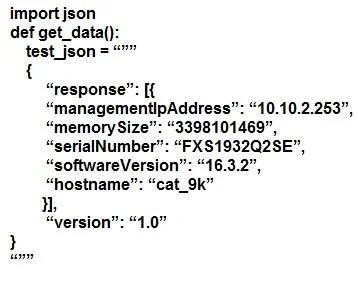
Options
- Areturn (json.dumps({d['hostname']: d['serialNumber'] for d in json.loads(test_json)['response']}))
- Breturn (json.dumps({for d in json.loads(test_json)['response']: d['hostname']: d['serialNumber']}))
- Creturn (json.loads({d['hostname']: d['serialNumber'] for d in json.dumps(test_json)['response'}))
- Dreturn (json.loads({for d in json.dumps(test_json)['response']: d['hostname']: d['serialNumber']}))
How the community answered
(18 responses)- A78% (14)
- B6% (1)
- C11% (2)
- D6% (1)
Why each option
To transform a JSON string into a specific JSON object, the Python function must parse the input, extract the required key-value pairs using a dictionary comprehension, and then serialize the resulting dictionary back to a JSON string.
This line correctly uses `json.loads(test_json)` to parse the input JSON string, then a dictionary comprehension `{{d['hostname']: d['serialNumber'] for d in json.loads(test_json)['response']}}` to create the desired key-value pair, and finally `json.dumps()` to convert the Python dictionary into the required JSON string output.
This choice contains a syntax error in the dictionary comprehension; the key-value pair must precede the `for` loop, i.e., `{{key: value for item in iterable}}`.
This choice incorrectly uses `json.dumps(test_json)` (attempting to serialize an already serialized string) and then `json.loads()` at the end, which would parse a JSON string, not serialize a Python dictionary to JSON.
This choice combines a syntax error in the dictionary comprehension (like B) with the incorrect use of `json.loads()` for the final output (like C).
Concept tested: Python JSON parsing and dictionary comprehension
Source: https://docs.python.org/3/library/json.html
Topics
Community Discussion
No community discussion yet for this question.