
350-401 · Question #1030
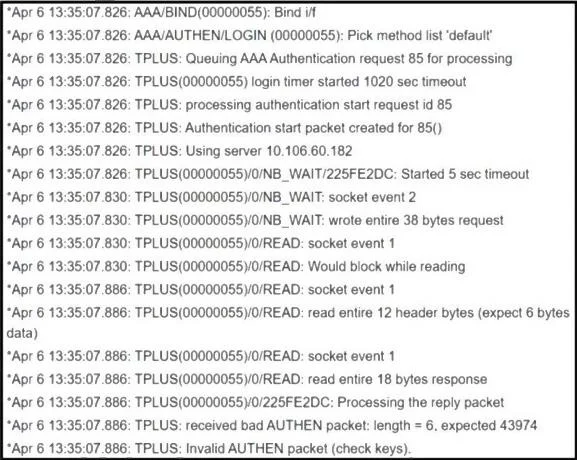
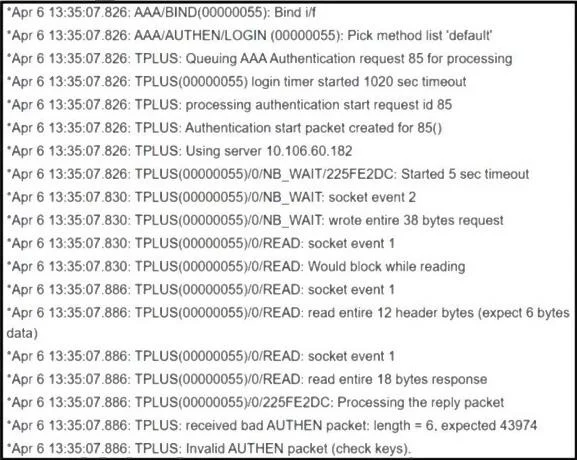
Refer to the exhibit. An engineer configured TACACS+ to authenticate remote users, but the configuration is not working as expected. Which configuration must be applied to enable access?
The correct answer is D. R1 (config)# tacacs server prod. If TACACS+ authentication is not working, the most fundamental step to enable access is ensuring the TACACS+ server itself is properly referenced or defined for the router to interact with.
Question
Exhibits
Options
- AR1 (config)# ip tacacs source-interface Gig 0/0
- BR1 (config)# tacacs server prod
- CR1 (config)# aaa authorization exec default group tacacs+ local
- DR1 (config)# tacacs server prod
How the community answered
(20 responses)- A5% (1)
- B10% (2)
- C25% (5)
- D60% (12)
Why each option
If TACACS+ authentication is not working, the most fundamental step to enable access is ensuring the TACACS+ server itself is properly referenced or defined for the router to interact with.
The command `ip tacacs source-interface Gig 0/0` specifies the source IP address for TACACS+ packets but does not enable the server interaction itself if the server is not defined or reachable.
This choice is identical to choice D, so it represents the same correct action.
The command `aaa authorization exec default group tacacs+ local` configures authorization methods for exec sessions, but it does not enable authentication or define the TACACS+ server if it's the missing piece.
The command `tacacs server prod`, while potentially an exam-simplified syntax or part of a larger configuration (e.g., within an AAA server group), is the most direct action among the choices to define or activate the specific 'prod' TACACS+ server for use. Without the server being known to the router, authentication cannot proceed.
Concept tested: TACACS+ server configuration
Source: https://www.cisco.com/c/en/us/td/docs/ios-xml/ios/security/dcr_security_book/sec-cfg-tacacs.html
Topics
Community Discussion
No community discussion yet for this question.