
350-001 · Question #186
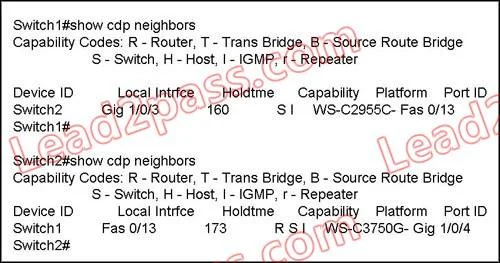
Refer to the exhibit. Look at the command output. What can you use to prevent this behavior?
The correct answer is A. UDLD. The Cisco-proprietary Unidirectional Link Detection (UDLD) protocol allows ports that are connected through fiber optics or copper (for example, Category 5 cabling) Ethernet cables to monitor the physical configuration of the cables and detect when a unidirectional link exists…
Question
Refer to the exhibit. Look at the command output. What can you use to prevent this behavior?
Exhibit
Options
- AUDLD
- Bspanning-tree loopguard
- CVTP mode transparent
- Dswitchport mode desirable
How the community answered
(46 responses)- A72% (33)
- B17% (8)
- C7% (3)
- D4% (2)
Explanation
The Cisco-proprietary Unidirectional Link Detection (UDLD) protocol allows ports that are connected through fiber optics or copper (for example, Category 5 cabling) Ethernet cables to monitor the physical configuration of the cables and detect when a unidirectional link exists. When the switch detects a unidirectional link, UDLD shuts down the affected LAN port and alerts the user. Unidirectional links can cause a variety of problems, including spanning tree topology loops. UDLD is a Layer 2 protocol that works with the Layer 1 protocols to determine the physical status of a link. At Layer 1, autonegotiation takes care of physical signaling and fault detection. UDLD performs tasks that autonegotiation cannot perform, such as detecting the identities of neighbors and shutting down misconnected LAN ports. When you enable both autonegotiation and UDLD, Layer 1 and Layer 2 detections work together to prevent physical and logical unidirectional connections and the malfunctioning of other protocols. A unidirectional link occurs whenever traffic transmitted by the local device over a link is received by the neighbor but traffic transmitted from the neighbor is not received by the local device. If one of the fiber strands in a pair is disconnected, as long as autonegotiation is active, the link does not stay up. In this case, the logical link is undetermined, and UDLD does not take any action. If both fibers are working normally at Layer 1, then UDLD at Layer 2 determines whether those fibers are connected correctly and whether traffic is flowing bidirectionally between the correct neighbors. This check cannot be performed by autonegotiation, because autonegotiation operates at Layer 1. A Cisco Nexus 5000 Series switch periodically transmits UDLD frames to neighbor devices on LAN ports with UDLD enabled. If the frames are echoed back within a specific time frame and they lack a specific acknowledgment (echo), the link is flagged as unidirectional and the LAN port is shut down. Devices on both ends of the link must support UDLD in order for the protocol to successfully identify and disable unidirectional links. The STP loop guard feature provides additional protection against Layer 2 forwarding loops (STP loops). An STP loop is created when an STP blocking port in a redundant topology erroneously transitions to the forwarding state. This usually happens because one of the ports of a physically redundant topology (not necessarily the STP blocking port) no longer receives STP BPDUs. In its operation, STP relies on continuous reception or transmission of BPDUs based on the port role. The designated port transmits BPDUs, and the non-designated port receives BPDUs. When one of the ports in a physically redundant topology no longer receives BPDUs, the STP conceives that the topology is loop free. Eventually, the blocking port from the alternate or backup port becomes designated and moves to a forwarding state. This situation creates a loop. The loop guard feature makes additional checks. If BPDUs are not received on a non-designated port, and loop guard is enabled, that port is moved into the STP loop-inconsistent blocking state, instead of the listening / learning / forwarding state. Without the loop guard feature, the port assumes the designated port role. The port moves to the STP forwarding state and creates a loop _4_0_1a/BasicEthernet.html#wp1267151
Topics
Community Discussion
No community discussion yet for this question.