
312-50V13 · Question #158
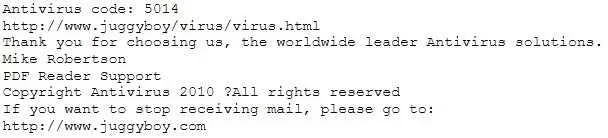
You receive an e-mail like the one shown below. When you click on the link contained in the mail, you are redirected to a website seeking you to download free Anti-Virus software. Dear valued…
The correct answer is C. Search using the URL and Anti-Virus product name into Google and lookout for suspicious. The most effective way to determine the legitimacy of an unsolicited anti-virus software offer is to search for the product name and URL online for third-party validation or warnings.
Question
Exhibit
Options
- ALook at the website design, if it looks professional then it is a Real Anti-Virus website
- BConnect to the site using SSL, if you are successful then the website is genuine
- CSearch using the URL and Anti-Virus product name into Google and lookout for suspicious
- DDownload and install Anti-Virus software from this suspicious looking site, your Windows 7 will
- EDownload and install Anti-Virus software from this suspicious looking site, your Windows 7 will
How the community answered
(33 responses)- A6% (2)
- B15% (5)
- C76% (25)
- E3% (1)
Why each option
The most effective way to determine the legitimacy of an unsolicited anti-virus software offer is to search for the product name and URL online for third-party validation or warnings.
A professional-looking website design is easily faked by scammers to mimic legitimate sites and should not be relied upon as proof of authenticity.
Connecting to the site using SSL (HTTPS) only confirms that the communication channel is encrypted, not that the website or the software it offers is genuine or trustworthy.
Searching for the URL and the Anti-Virus product name on a reliable search engine like Google is the best approach, as it will likely reveal forum discussions, security alerts, or official reviews that indicate if the software is legitimate or a known fake/scam. This leverages collective intelligence and established security communities.
Downloading and installing software from a suspicious site is a highly risky action that directly exposes your system to potential malware or fake antivirus, which is exactly what you are trying to avoid.
Concept tested: Identifying phishing/scam websites
Source: https://learn.microsoft.com/en-us/microsoft-365/security/defender/identify-phishing-scams
Topics
Community Discussion
No community discussion yet for this question.