
312-50V11 · Question #689
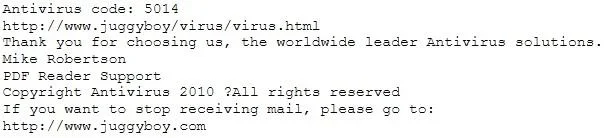
You receive an e-mail like the one shown below. When you click on the link contained in the mail, you are redirected to a website seeking you to download free Anti-Virus software. Dear valued…
The correct answer is C. Search using the URL and Anti-Virus product name into Google and lookout for suspicious. Searching the suspicious URL and product name in a search engine is the safest method to identify rogue antivirus software without exposing your system to risk.
Question
You receive an e-mail like the one shown below. When you click on the link contained in the mail, you are redirected to a website seeking you to download free Anti-Virus software. Dear valued customers, We are pleased to announce the newest version of Antivirus 2010 for Windows which will probe you with total security against the latest spyware, malware, viruses, Trojans and other online threats. Simply visit the link below and enter your antivirus code:
or you may contact us at the following address: Media Internet Consultants, Edif. Neptuno, Planta Baja, Ave. Ricardo J. Alfaro, Tumba Muerto, n/a Panama How will you determine if this is Real Anti-Virus or Fake Anti-Virus website?
Exhibit
Options
- ALook at the website design, if it looks professional then it is a Real Anti-Virus website
- BConnect to the site using SSL, if you are successful then the website is genuine
- CSearch using the URL and Anti-Virus product name into Google and lookout for suspicious
- DDownload and install Anti-Virus software from this suspicious looking site, your Windows 7 will
- EDownload and install Anti-Virus software from this suspicious looking site, your Windows 7 will
How the community answered
(27 responses)- A4% (1)
- B4% (1)
- C85% (23)
- D7% (2)
Why each option
Searching the suspicious URL and product name in a search engine is the safest method to identify rogue antivirus software without exposing your system to risk.
Professional visual design is not a reliable indicator of legitimacy - rogue antivirus campaigns routinely invest in polished interfaces to increase victim trust.
A valid SSL certificate only encrypts the connection and confirms domain ownership; it does not verify that the site or software is safe or legitimate.
Using a search engine to query the URL and product name surfaces existing community reports, security researcher write-ups, and antivirus vendor blacklist entries that identify known rogue AV campaigns. This approach requires no direct interaction with the malicious site and leverages aggregated threat intelligence to confirm or deny the site's legitimacy before any download occurs.
Downloading and installing software from a suspicious site would execute the malicious payload and infect the system, making this the worst possible action to take.
Identical to option D - downloading from a suspicious site installs the malware rather than verifying the site's legitimacy.
Concept tested: Identifying rogue antivirus social engineering attacks
Source: https://www.cisa.gov/news-events/tips/us-cert-alerts-users-fake-antivirus-software
Topics
Community Discussion
No community discussion yet for this question.